13 Rose Petal Brushes for Digital Art
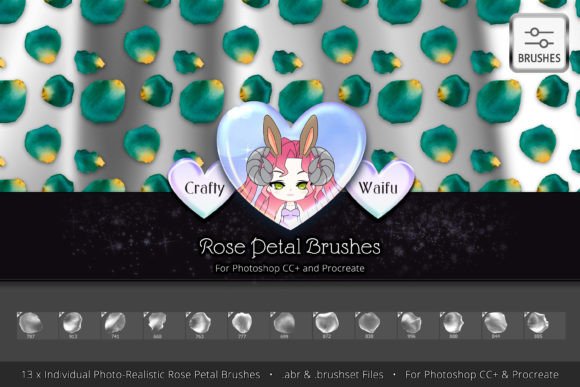
Digital design often requires a delicate touch, especially when the goal is to evoke emotion through visuals. Whether you are crafting a wedding invitation, designing a romantic social media post, or adding subtle texture to a portrait, finding the right assets can make all the difference. This is where specialized tools like the 13 Rose Petal Brushes come into play. Designed specifically for creators using Photoshop CC and Procreate, this installable brush set offers a shortcut to achieving photorealistic floral effects without the need for complex manual painting or expensive stock photography licenses.
The core appeal of this collection lies in its simplicity and high quality. Instead of spending hours trying to paint a single petal from scratch, you have thirteen unique, pre-made shapes at your fingertips. Each brush was created from high-definition photographs, ensuring that the textures, veins, and color gradients look authentic. For beginners, this removes the intimidation factor of digital painting. For professionals, it significantly speeds up workflow, allowing more time to focus on composition and layout rather than repetitive detailing.
Why Photorealism Matters in Digital Design
In an era where audiences are visually sophisticated, flat or cartoonish elements do not always fit the brand aesthetic. Many small business owners, marketers, and freelance designers are tasked with creating materials that feel organic and premium. The 13 Rose Petal Brushes for Photoshop CC and Procreate address this need by providing intricately detailed assets that blend seamlessly into various backgrounds.
Because these brushes are derived from HD photographs, they retain the natural imperfections that make real flowers beautiful. You will notice subtle variations in light and shadow on each petal. This level of detail is crucial when creating designs for print, such as brochures or packaging, where low-resolution or vector-style graphics might appear artificial. By using photorealistic elements, your designs gain a tactile quality that invites the viewer to look closer.
Practical Applications for Creators
Understanding how to integrate these brushes into your workflow is key to unlocking their value. Here are several realistic scenarios where this toolset shines:
- Wedding and Event Stationery: If you are a designer specializing in wedding invitations, save-the-dates, or menu cards, rose petals are a timeless motif. Using these brushes allows you to create custom borders or scattered accents that match specific color schemes. You can adjust the opacity and hue to match blush, ivory, or deep red themes effortlessly.
- Valentine’s Day Marketing: Retailers and bloggers often ramp up content creation in February. Instead of relying on generic clip art, you can use these brushes to create unique headers for blog posts, email newsletters, or Instagram stories. The romantic aesthetic aligns perfectly with the holiday while maintaining a professional look.
- Beauty and Skincare Branding: Brands that emphasize natural ingredients often use floral imagery to convey softness and purity. These petal brushes can be used to frame product photos or add decorative elements to social media ads, reinforcing the brand’s connection to nature.
- Digital Scrapbooking and Journaling: For hobbyists who enjoy digital journaling in Procreate, these brushes add a personal, hand-crafted feel to daily entries. They are excellent for decorating pages dedicated to memories, gratitude logs, or creative writing prompts.
Getting Started: Tips for Best Results
If you are new to using brush sets, the process is straightforward but benefits from a few best practices. First, ensure your software is compatible. This set is designed for Photoshop CC and Procreate, two of the most popular platforms for digital artists. Once installed, you will see thirteen distinct brushes in your library. It is important to note that each petal is unique; rotating and resizing them will help you avoid a repetitive, stamped look.
When applying the brushes, consider the lighting in your overall composition. If your background has a light source coming from the top left, try to orient the petals so their shadows align with that direction. You can also experiment with layer blending modes. Setting a petal layer to "Multiply" can help it integrate better with textured backgrounds, while "Screen" or "Overlay" might work well for glowing, ethereal effects.
Color customization is another powerful feature. Since the brushes are based on photographs, they may have inherent color tones. However, you can easily use the hue/saturation adjustment tools in your software to shift the petals from classic red to pastel pink, white, or even unconventional colors like lavender or blue to match specific brand guidelines.
Important Considerations Before You Buy
While the 13 Rose Petal Brushes offer significant value, it is wise to consider your specific needs before purchasing. First, assess your current software setup. If you primarily use Illustrator or Canva, these brushes will not be directly compatible unless you are importing rasterized elements. They are optimized for pixel-based editing environments.
Secondly, think about the scale of your projects. These brushes are highly detailed, which makes them ideal for close-up work or medium-sized designs. If you are creating massive billboards, ensure your document resolution is high enough to maintain the clarity of the HD photographic details. Conversely, for tiny icons, the intricate details might get lost, so simpler shapes might be more effective in those specific cases.
Finally, consider the learning curve. While these tools are beginner-friendly, mastering the art of digital compositing takes practice. Do not expect perfect results with a single click. The magic happens when you layer multiple petals, adjust their transparency, and blend them into the background. Patience and experimentation will yield the most professional outcomes.
Enhancing Your Creative Toolkit
Investing in quality assets like this brush set is an investment in your efficiency and creative potential. For entrepreneurs and freelancers, time is money. Being able to quickly generate high-quality floral elements means you can take on more projects or deliver work faster. For hobbyists, it removes technical barriers, allowing you to focus on the joy of creation rather than the struggle of technique.
The versatility of the 13 Rose Petal Brushes ensures they remain useful beyond seasonal trends. While they are perfect for Valentine’s Day or weddings, roses are a classic symbol that transcends specific holidays. They can be used in memorial designs, luxury branding, or artistic portraits. By adding this set to your library, you are equipping yourself with a flexible tool that adapts to a wide range of creative challenges.
Ultimately, the goal of any design tool is to help you express your vision more clearly. These brushes provide the raw material—the beauty of nature—captured in a digital format that is easy to manipulate. Whether you are a seasoned graphic designer looking to streamline your workflow or a beginner eager to create something beautiful, this collection offers a reliable and elegant solution for adding floral elegance to your digital projects.