Doodle Oval Photoshop Brushes for Designers
In the fast-paced world of digital design, efficiency often battles with authenticity. Clients and audiences alike are increasingly drawn to visuals that feel human, organic, and approachable rather than sterile and overly polished. This is where Doodle Oval Photoshop Brushes become an invaluable asset in your creative toolkit. By integrating hand-drawn elements into your workflow, you can instantly soften rigid layouts, add personality to corporate materials, and create visual hierarchies that guide the viewer’s eye naturally.
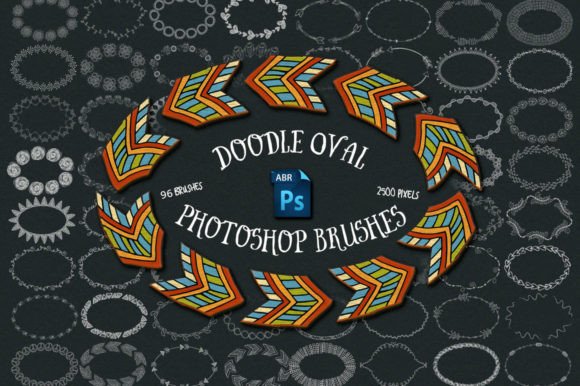
This specific collection offers a robust solution for designers who need versatility without sacrificing quality. Comprising 96 unique hand-drawn doodle oval brushes, this set provides a wide variety of shapes, textures, and line weights. Each brush is rendered at 2500 pixels, ensuring that they remain crisp and detailed even when scaled up for large-format prints or high-resolution displays. Whether you are a seasoned graphic designer, a social media manager, or a small business owner handling your own marketing, understanding how to leverage these tools can significantly enhance your output.
Enhancing Visual Communication with Organic Shapes
Ovals and circles are fundamental shapes in design psychology, often representing unity, community, and focus. However, perfect geometric circles can sometimes feel cold or mechanical. Hand-drawn ovals introduce a subtle imperfection that resonates with viewers on a subconscious level, suggesting warmth and creativity. The Doodle Oval Photoshop Brushes allow you to harness this psychological impact effortlessly.
Consider the practical application in educational materials or presentation decks. When highlighting key data points or quoting testimonials, placing text within a hand-drawn oval frame draws immediate attention without the aggression of a bright red box or a heavy border. The irregular lines suggest a personal touch, making the information feel curated and important. For educators and trainers, this can make complex information more digestible and less intimidating for students.
Streamlining Workflow with High-Resolution Assets
One of the most significant advantages of this particular set is the resolution. At 2500 pixels, these brushes are not merely screen-sized icons; they are production-ready assets. Many free brush sets suffer from pixelation when used in print projects or resized for different aspect ratios. With these Doodle Oval Photoshop Brushes, you can confidently use them for everything from Instagram stories to large trade show banners.
The inclusion of 96 distinct variations means you are unlikely to encounter repetitive patterns in your work. Repetition is the enemy of engaging design. If you are creating a series of social media posts, using the same oval shape for every highlight can make your feed look templated and lazy. Having a diverse library allows you to match the specific mood of each piece. A rough, sketchy oval might suit a behind-the-scenes post, while a cleaner, smoother doodle could frame a professional announcement. This variety supports brand consistency while allowing for creative flexibility.
Practical Applications Across Industries
The utility of these brushes extends far beyond traditional graphic design. Here is how different professionals can integrate them into their daily tasks:
- Social Media Managers: Use the ovals to create cohesive highlight covers for Instagram or to frame product shots in Pinterest pins. The hand-drawn aesthetic stands out in feeds dominated by sleek, corporate imagery.
- Educators and Coaches: Enhance worksheets, eBooks, and slide decks. Framing key takeaways or homework assignments in doodle ovals makes the material feel more approachable and less like a rigid textbook.
- Web Designers: Break up long blocks of text on landing pages. Placing a call-to-action button inside a subtle doodle oval can increase click-through rates by drawing the eye naturally to the interactive element.
- Small Business Owners: Create unique packaging labels or thank-you cards. The personal touch of a hand-drawn element can reinforce the artisanal or boutique nature of a brand.
Leveraging Bonus Assets for Immediate Results
Time is often the scarcest resource for creators. While brushes offer infinite customization, sometimes you need a quick solution. This download includes ten pre-made PNG frames at 300 DPI. These are ready-to-use assets that require no brushing technique or layer masking. You can simply drag and drop them into your project, place your image or text underneath, and you are done.
These bonus frames are particularly useful for non-designers who may find the learning curve of Photoshop brushes steep. They provide an immediate way to achieve the hand-drawn look without needing to master brush dynamics or pressure sensitivity. For marketers working under tight deadlines, these PNGs can be the difference between a generic post and a branded, engaging visual.
Technical Considerations and Best Practices
To get the most out of Doodle Oval Photoshop Brushes, it is important to understand the technical requirements. These files are in .abr format, which is native to Adobe Photoshop. You will need a version of Photoshop that supports brush imports. It is worth noting that no instructions are included in the download. This assumes a basic level of familiarity with the software. If you are new to Photoshop, you may need to consult online tutorials on how to install and manage custom brushes.
When using the brushes, consider the opacity and flow settings. Lowering the opacity can create a softer, more watercolor-like effect, while keeping it at 100% gives a bold, marker-like appearance. Experimenting with these settings allows you to adapt the same brush to different design contexts. Additionally, because these are hand-drawn, they may have varying levels of transparency in the strokes. Using them on solid backgrounds usually yields the best results, though they can work on textured backgrounds if the contrast is sufficient.
Who Should Invest in This Tool?
This set is ideal for creatives who value efficiency but refuse to compromise on aesthetic quality. If you frequently find yourself searching for "hand-drawn frames" or spending time sketching your own borders, this library will save you hours of work. It is particularly beneficial for freelancers who manage multiple clients with different brand voices, as the variety in the 96 brushes allows for broad stylistic adaptation.
However, if you require perfectly geometric, mathematically precise shapes, standard vector tools in Illustrator or Photoshop may be more appropriate. These brushes are designed to mimic human handwriting, so they inherently possess irregularities. Embrace these imperfections as part of their charm and communicative power.
In conclusion, Doodle Oval Photoshop Brushes offer a practical, high-quality solution for adding warmth and personality to digital projects. By combining high-resolution assets with a diverse range of styles, this set empowers creators to produce engaging, professional-grade visuals efficiently. Whether you are framing a quote, highlighting a product, or designing an educational resource, these tools provide the flexible, human touch that modern audiences crave.