Mastering Digital Ink: A Deep Dive into the Tattoo Toolkit Procreate Brushes
The transition from skin to screen has revolutionized how tattoo artists conceptualize their craft. For years, the gap between a rough sketch on paper and a polished digital design felt insurmountable for many traditionalists. However, tools like the Tattoo Toolkit Procreate Brushes have effectively bridged that divide, offering a suite of digital instruments that mimic the tactile reality of needle work. This isn’t just about drawing lines; it is about replicating the specific behaviors of ink under the skin, allowing artists to create hyper-realistic mockups and precise stencils directly on their iPads.
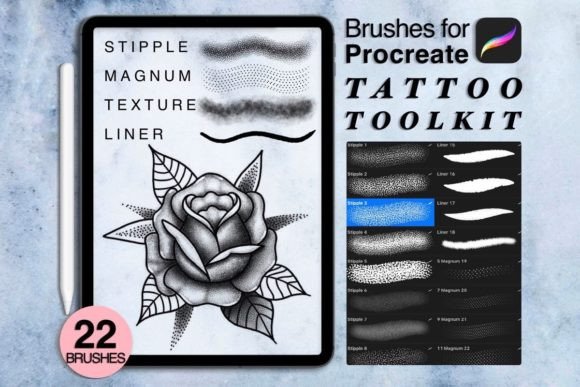
When you download this toolkit, you are not getting a generic set of art supplies. You are accessing a specialized library designed with the nuances of tattooing in mind. The package includes 22 distinct brushes, categorized into stipple, texture, liner, and magnum groups. These aren't random additions; they correspond directly to the physical needle configurations artists use daily. Understanding how to leverage these specific brush types can drastically reduce the time spent on client consultations and design revisions.
Streamlining the Client Consultation Process
One of the most immediate practical applications of this toolkit is during the initial client meeting. In the past, an artist might sketch a rough idea on paper, take a photo, and hope the client could visualize the final result. With the Tattoo Toolkit Procreate Brushes, you can pull up a photo of the client’s body part and overlay your design in real-time. The inclusion of five texture brushes allows you to simulate how different shading techniques will look on various skin tones and textures.
Imagine a client wants a blackwork piece with heavy saturation. Using the four Magnum brushes included in the zip file, you can quickly block out large areas of solid black or soft gradients, showing exactly how the light will hit the healed tattoo. This visual aid helps manage expectations immediately. Clients often struggle to understand the difference between a "soft wash" and a "hard pack," but seeing it rendered digitally with accurate brush dynamics makes the explanation effortless. It transforms the consultation from a guessing game into a collaborative design session.
Perfecting Stippling and Dotwork Precision
Dotwork and stippling are among the most time-consuming styles to execute manually, requiring immense patience and steady hands. Digitally, however, they can be notoriously difficult to replicate without looking artificial. Many standard digital brushes create uniform, robotic dots that lack the organic variation of hand-poked ink. The nine Stipple Brushes in this toolkit address this specific pain point.
These brushes are engineered to introduce subtle irregularities in size and spacing, mimicking the natural variance of a single needle hitting the skin. For artists specializing in geometric patterns or mandala designs, this feature is invaluable. You can build up density gradually, just as you would in real life, by layering passes rather than relying on opacity sliders alone. This approach ensures that when you eventually transfer the stencil to skin, the reference image accurately reflects the workload involved. It prevents the common issue of over-promising intricate detail that may blur over time, as the digital preview shows the true limits of dot resolution.
Creating Realistic Linework and Flow
Linework is the backbone of any tattoo, and digital lines often suffer from being too perfect. They lack the slight tremor, weight variation, and tapering that give hand-drawn lines their character. The four Liner Brushes provided in the Tattoo Toolkit Procreate Brushes collection are pressure-sensitive, meaning they respond dynamically to how hard you press with your Apple Pencil.
This sensitivity is crucial for creating flowy, organic lines that resemble whip-shading or traditional bold outlines. When designing flash sheets or custom pieces, you can switch between a fine liner for intricate details and a heavier liner for bold contours without changing tools constantly. This fluidity keeps you in the creative zone. Furthermore, because these brushes are optimized for Procreate version 5.0 and higher, they integrate seamlessly with the app’s streamline features, helping you achieve smooth curves while maintaining the aesthetic of hand-drawn ink.
Industry Applications Beyond Traditional Tattooing
While primarily designed for tattoo artists, the utility of these brushes extends to several adjacent creative industries. Concept artists working in gaming or film often need to design characters with visible tattoos. Using generic round brushes results in designs that look like stickers placed on top of the character. By utilizing the texture and magnum brushes from this toolkit, concept artists can render tattoos that appear embedded in the skin, complete with appropriate shading and distortion over muscles.
Fashion illustrators also benefit significantly from this resource. As body art becomes increasingly integrated into high fashion, illustrators need accurate ways to depict sleeve tattoos or neck pieces on their models. The stipple brushes allow for delicate, jewelry-like detailing that complements fabric textures without overpowering them. Additionally, graphic designers creating merchandise for tattoo shops can use these brushes to produce authentic-looking promotional materials that resonate with the target audience’s aesthetic sensibilities.
Technical Considerations and Setup
Before diving into creation, it is essential to ensure your hardware and software are compatible. This toolkit requires an iPad Pro or a standard iPad paired with an Apple Pencil or a stylus that supports pressure sensitivity. Without pressure sensitivity, the nuanced capabilities of the liner and magnum brushes will be lost, reducing them to static stamps. Ensure your Procreate app is updated to version 5.0 or higher to avoid import errors or functionality glitches.
Upon purchase, you will receive an instant download link for a ZIP file. Inside, you will find the .brushes files ready for import. It is important to note that this is a digital product; no physical items will be shipped. Also, while the promotional images may showcase specific fonts, mockups, or background photos, these are for presentation purposes only and are not included in the download. Focus solely on the 22 brush files and any included swatches.
One limitation to keep in mind is that digital brushes, no matter how advanced, cannot fully replicate the unpredictability of human skin. Factors like skin elasticity, age, and aftercare affect how ink settles. Therefore, use these digital renders as a guide for composition and shading balance, not as a guaranteed photographic prediction of the healed result. Always communicate this distinction to clients to maintain professional integrity.
Maximizing Workflow Efficiency
To get the most out of the Tattoo Toolkit Procreate Brushes, consider organizing your brush library logically. Create a dedicated group for these 22 tools so they are always accessible during client sessions. Experiment with combining the texture brushes with the liners to create custom effects, such as aged or distressed looks for traditional American style tattoos. The ability to undo and redo instantly allows for rapid experimentation that is impossible on skin, encouraging you to push creative boundaries without risk.
Ultimately, this toolkit is about enhancing your artistic voice, not replacing it. It provides the technical foundation to express your ideas with clarity and precision. Whether you are a seasoned artist looking to modernize your consultation process or a beginner aiming to understand the mechanics of shading and line weight, these brushes offer a practical, immediate solution. By integrating these tools into your daily workflow, you elevate not just your digital designs, but the overall quality of service you provide to your clients.