Modern Tech Procreate Brushes
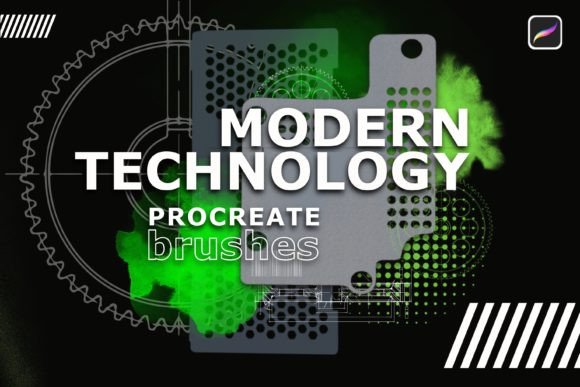
The intersection of digital art and industrial design has never been more accessible. For creators working on the iPad Pro with an Apple Pencil, the right tools can transform a blank canvas into a blueprint for the future. This is where Modern Technology Procreate Brushes come into play. This versatile and diverse set of twenty-five specialized tools is designed specifically for sketching and drawing modern techno designs. By installing these brushes, artists and designers can immediately begin producing high-quality, professional-grade results without the steep learning curve often associated with custom brush creation.
What makes this collection particularly interesting is its focus on precision and aesthetic cohesion. Unlike generic sketching tools that mimic traditional media like charcoal or watercolor, these brushes are engineered to replicate the clean lines, geometric precision, and textured surfaces found in contemporary technology products. Whether you are conceptualizing a new wearable device, illustrating a futuristic vehicle, or designing user interface elements, this set provides the foundational assets needed to visualize complex ideas quickly and effectively.
Unlocking Creative Possibilities
The primary advantage of using a specialized brush set lies in its ability to streamline the creative workflow. When you remove the friction of trying to force a standard round brush to look like a machined metal surface, you free up mental energy for ideation. The twenty-five brushes included in this pack cover a wide spectrum of needs, from rough initial concepting to polished final renders.
Consider the variety of textures available. Modern tech design is not just about sleek glass; it involves matte plastics, brushed aluminum, carbon fiber, and intricate circuitry. With these tools, you can layer different strokes to build depth and realism. You might start with a loose, gestural brush to map out the form factor of a smartphone, then switch to a fine-line technical pen to define the bezel and button placements. Finally, a specialized shading brush can add the subtle gradients that suggest light reflecting off a curved screen.
This approach encourages experimentation. Because the brushes are pre-configured for optimal performance on the iPad Pro, you can focus on how different stroke weights and opacities interact. Try combining a hard-edge marker style with a soft airbrush to create a sense of volume. The result is a drawing that feels both organic and engineered, capturing the essence of modern industrial design.
Applications for Diverse Creators
While these brushes are tailored for techno design, their utility extends far beyond a single niche. Different professionals can adapt this toolkit to meet their specific goals and audience needs.
- Industrial Designers: Use the precision tools to rapidly prototype product shapes during client meetings. The ability to draw clean, perspective-accurate lines helps communicate functionality clearly.
- UI/UX Designers: Incorporate these brushes to sketch out hardware contexts for your apps. Showing how an interface looks on a realistically rendered device adds credibility to your presentations.
- Concept Artists: Build immersive sci-fi environments. The texture brushes are perfect for adding wear and tear to robots, spaceships, or cyberpunk cityscapes, giving your worlds a lived-in feel.
- Educators and Students: Teach the principles of form and function. These brushes simplify the technical aspect of rendering, allowing students to focus on understanding light, shadow, and proportion.
- Marketers and Bloggers: Create unique header images or social media graphics. Instead of relying on stock photos, you can illustrate custom tech products that align perfectly with your brand’s narrative.
Each group benefits from the consistency the brushes provide. When your entire team uses the same toolkit, the visual language of your projects remains cohesive, reinforcing brand identity and professional standards.
Practical Tips for Best Results
To get the most out of your Modern Technology Procreate Brushes, it is essential to understand how to organize your workflow. Start by grouping your favorite brushes into a quick-access menu. Since there are twenty-five options, having your top five readily available prevents interruption during the flow state. Consider categorizing them by function: sketching, detailing, texturing, and highlighting.
Pressure sensitivity is key. The Apple Pencil offers nuanced control, so take time to adjust the pressure curves in Procreate settings if the default feel does not match your hand. Some brushes in this set may respond better to light touches for fine details, while others require firm pressure to achieve full opacity. Experimenting with these settings ensures that every stroke feels intentional.
Layer management is another critical component. Keep your sketch layers separate from your color and texture layers. This non-destructive approach allows you to refine the underlying structure without compromising the detailed work you have done on top. Use clipping masks for adding textures like carbon fiber or metal grain, ensuring they stay within the boundaries of your object.
Maintaining Originality and Clarity
In a digital age where trends can become homogenized, maintaining originality is crucial. While these brushes provide a strong foundation, they are merely tools. Your unique perspective is what brings the design to life. Avoid relying solely on preset effects. Instead, use the brushes as a starting point and modify them to suit your specific project. Adjust the hue, saturation, and brightness to create custom color palettes that stand out.
Clarity in communication is equally important. Whether you are presenting to a client or sharing on social media, ensure your drawings are easy to interpret. Use high-contrast lines for key features and softer edges for secondary elements. This hierarchy guides the viewer’s eye and emphasizes the most important aspects of your design. Remember, the goal is not just to create something that looks cool, but to convey an idea effectively.
Expanding Your Digital Toolkit
Integrating Modern Technology Procreate Brushes into your routine is an investment in your creative efficiency. By reducing the time spent on technical execution, you gain more time for exploration and refinement. This set is not just about drawing faster; it is about drawing smarter. It empowers you to tackle complex subjects with confidence, knowing that your tools are aligned with your vision.
As you continue to develop your skills, consider how these brushes can evolve with your style. You might find that certain combinations work exceptionally well for automotive design, while others are better suited for consumer electronics. Document these discoveries. Keep a swipe file of successful experiments to reference in future projects. This practice builds a personal library of techniques that enhances your versatility as a creator.
Ultimately, the value of this brush set lies in its ability to bridge the gap between imagination and realization. For anyone looking to elevate their digital art, whether for professional commissions or personal passion projects, these tools offer a reliable pathway to stunning results. Install the brushes, pick up your Apple Pencil, and start creating. The only limit is your creativity.