Shimmering Brushes for Procreate
Digital art often struggles to capture the tactile magic of physical media. While tablets offer precision, they can sometimes feel sterile compared to the unpredictability of paint, ink, or glitter on paper. This is where specialized tools become essential. The Procreate Brushset - Shimmering Brushes is designed to bridge that gap, offering artists a way to inject light, texture, and organic imperfection into their digital canvases. Whether you are illustrating a children’s book, designing social media graphics, or creating fine art prints, this collection provides the necessary assets to make your work stand out.
What Makes This Brush Set Unique
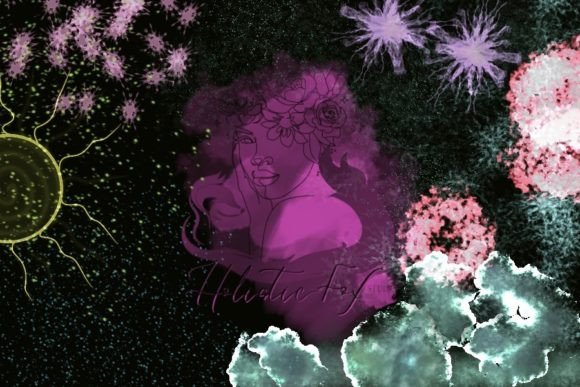
At its core, this package contains 29 unique, artistic brushes tailored specifically for the Procreate environment. Unlike standard round or square brushes that focus solely on shape, these tools are engineered to simulate complex visual effects. They are described as funky and fun because they break away from rigid perfection. Instead, they embrace randomness and variation, which is key to achieving a natural look.
The primary value lies in their versatility. You are not limited to just one style of effect. The set allows you to create glitter textures that catch the imaginary light, grunge overlays that add depth and age, and soft bokeh backgrounds that draw the viewer’s eye to specific focal points. By integrating these elements, you can transform a flat digital illustration into something that feels layered and dynamic.
Practical Applications for Creators
Understanding how to use these tools effectively requires looking at real-world scenarios. Here are several ways different types of users can benefit from this brush set:
- Social Media Content: Influencers and small business owners often need eye-catching visuals. Adding subtle star backgrounds or shimmering accents to product photos or quote graphics can increase engagement without requiring advanced photo editing skills.
- Digital Illustration: Character artists can use the grunge textures to add wear and tear to clothing or environments. Meanwhile, fantasy illustrators might use the glitter brushes to depict magical spells, fairy dust, or enchanted forests.
- Greeting Card Design: For those selling digital or print-on-demand cards, the ability to simulate metallic foils or sparkly textures adds perceived value to the final product, making it feel more premium.
- Educational Materials: Teachers creating engaging slides or worksheets can use bokeh effects to soften backgrounds, ensuring text remains readable while keeping the design visually appealing for students.
Key Features and Technical Details
Before downloading, it is important to understand the technical specifications to ensure compatibility with your workflow. The file comes in the .brushset format, which is native to Procreate. This ensures seamless integration without the need for third-party converters or complex setup processes.
The set is compatible with all versions of Procreate, meaning you do not need to worry about updating your app to the latest beta to use these tools. However, there are a few practical considerations to keep in mind:
- Preview Images: Note that preview images are not included in the zip file. This means you should rely on the seller’s listing photos to understand exactly what each brush does before purchasing, as you won’t have a reference sheet inside the folder itself.
- File Management: The download is a zip file. You will need to extract this on your iPad before importing. This is a standard procedure for most digital brush purchases but can be confusing for first-time buyers.
- Device Requirements: Since these brushes rely on Procreate’s rendering engine, performance may vary slightly depending on your iPad model. Older devices might experience minor lag when using high-density glitter brushes on large canvases.
How to Install and Get Started
Installation is straightforward, but following the correct steps ensures the brushes appear correctly in your library. Here is a simple guide to getting started:
First, download the zip file. You can do this directly on your iPad via Safari or another browser, or download it to a computer and transfer it via AirDrop. If you choose AirDrop, ensure both devices are connected and discoverable.
Once the file is on your iPad, tap on it to unzip the contents. You should see the .brushset file. Tap this file, and it should automatically open in Procreate. If it does not open automatically, you can import it manually by opening Procreate, going to the Brush Library, tapping any brush set name, and selecting "Import" from the top right menu. Navigate to your files, select the brushset, and it will appear in your library.
Tips for Best Results
To get the most out of the Shimmering Brushset, consider layering techniques. Glitter and shimmer effects often look best when placed on a separate layer above your main artwork. This allows you to adjust the opacity and blending modes independently. Try using "Screen" or "Add" blending modes to make the light effects pop against darker backgrounds.
Additionally, do not be afraid to experiment with size and pressure sensitivity. Many of these brushes respond to how hard you press with the Apple Pencil. A light touch might create a sparse scattering of stars, while a firm press could create a dense cluster of glitter. Adjusting the streamlining settings in Procreate can also help control the flow of grunge textures, allowing for smoother or more jagged lines depending on your artistic intent.
For beginners, start by using these brushes as accents rather than the main focus. Add a subtle bokeh effect to a portrait background or a touch of grunge to a textured paper overlay. As you become more comfortable with how the brushes behave, you can begin to use them more boldly. Remember, the goal is to enhance your creativity, not overwhelm it. These tools are meant to be fun and functional, helping you achieve professional-looking results with minimal effort.
Ultimately, the Procreate Brushset - Shimmering Brushes offers a practical solution for artists looking to expand their digital toolkit. By providing easy-to-use, high-quality textures and effects, it empowers creators to produce work that feels alive, textured, and uniquely their own. Whether you are a hobbyist exploring digital art for the first time or a seasoned professional looking to streamline your workflow, this set provides the sparkle needed to elevate your next project.