Unlocking Creativity: A Beginner’s Guide to Procreate Cute Doodle Stamp Brushes
In the rapidly evolving world of digital art, efficiency and aesthetic appeal are paramount. Whether you are a professional illustrator, a social media manager, or a hobbyist looking to decorate your digital journal, the tools you choose can significantly impact your workflow. One such tool that has gained immense popularity among iPad artists is the Procreate Cute Doodle Stamp Brush set. This specialized collection transforms complex drawing tasks into simple, satisfying taps, allowing creators to produce high-quality, aesthetic visuals with minimal effort.
What Are Procreate Doodle Stamp Brushes?
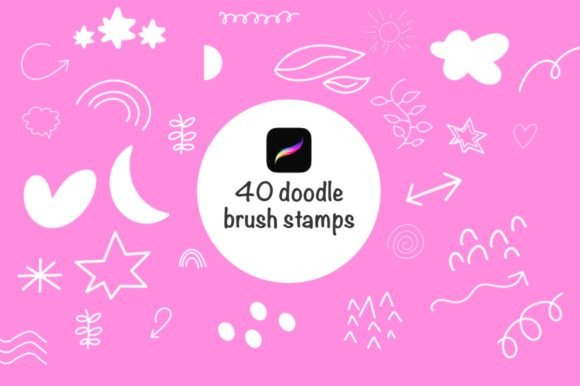
To understand the value of these brushes, it is essential to first clarify what they are. Unlike traditional brushes that simulate paint, pencil, or ink strokes, stamp brushes function more like digital stickers. When you tap the screen with an Apple Pencil, the brush "stamps" a pre-designed image onto your canvas. In the context of a cute doodle set, these stamps typically include charming elements such as stars, hearts, flowers, clouds, coffee cups, and whimsical characters.
The specific set we are exploring contains 40 beautifully designed cute doodle brush stamps. These are not random shapes; they are curated artistic assets designed to maintain a cohesive visual style. This consistency is crucial for creating professional-looking projects where every element feels like it belongs together.
The Technical Foundation: Compatibility and Ease of Use
Before diving into creative applications, it is vital to address the technical requirements. Digital art tools are often version-dependent. These specific brushes are optimized for Procreate version 5 or higher. This requirement ensures that the brushes leverage the latest engine improvements in the app, providing smoother performance, better pressure sensitivity response, and enhanced stability.
One of the most significant advantages of this particular brush set is its user-friendly nature. For beginners who might feel overwhelmed by the complex settings within Procreate, these brushes offer a plug-and-play experience. They are very easy to use, requiring no advanced knowledge of brush studio settings. You simply select the brush, choose your color, and start tapping. This low barrier to entry makes digital art more accessible to those who may not have strong freehand drawing skills but still wish to create visually appealing content.
Why Aesthetic Consistency Matters in Modern Digital Content
We live in a visual-first era. From Instagram feeds to Pinterest boards, the aesthetic quality of an image often determines its engagement level. This is where the concept of "aesthetic" becomes more than just a buzzword; it is a strategic component of personal branding and communication.
Using a cohesive set of doodle stamps helps achieve this aesthetic consistency. When you use 40 different brushes from the same designer, the line weights, styles, and proportions remain uniform. This uniformity creates a harmonious look that is pleasing to the eye. Whether you are designing a background for a YouTube thumbnail or adding decorative elements to a digital planner, this consistency signals professionalism and attention to detail.
Practical Applications for Creators and Businesses
The versatility of cute doodle stamp brushes extends far beyond simple sketching. Here are several practical ways these tools fit into modern creative workflows:
- Social Media Content Creation: Instagram posts and stories thrive on engaging visuals. Adding cute doodles can break up text, highlight key points, or add personality to product photos. For example, a bakery could use cookie and cake stamps to decorate their promotional graphics.
- Digital Journaling and Planning: The rise of digital planners on iPads has created a huge demand for decorative elements. Instead of searching for individual PNG files, users can quickly stamp dates, moods, and decorative borders directly onto their planner pages.
- Educational Materials: Teachers and educators can use these brushes to make worksheets and presentations more engaging for students. Simple, cute icons can help illustrate concepts without distracting from the educational content.
- Web and App Design Prototyping: Designers can use these stamps to quickly mock up friendly, approachable user interfaces, adding a human touch to wireframes before moving to high-fidelity designs.
Mastering the Tools: Color and Size Adjustment
While the stamps are pre-designed, they are not rigid. A common misconception among beginners is that stamp brushes are static and unchangeable. In reality, Procreate offers robust controls that allow for significant customization.
Easy to change the colors: One of the primary benefits of using vector-style or high-resolution raster stamps in Procreate is color flexibility. By simply selecting a new color from the palette before stamping, you can match the doodles to any brand identity or mood board. Want a pastel pink heart for a Valentine’s post? Switch to blue for a corporate newsletter? It takes seconds. This adaptability ensures that the 40 brushes can serve hundreds of different design needs.
Easy to adjust the size: Scale is critical in composition. Procreate allows users to adjust the brush size dynamically using the slider on the left side of the screen or by using two-finger gestures. This means you can use the same flower stamp as a tiny accent in a corner or as a large, dominant background element. This scalability ensures that the brushes remain useful regardless of the canvas size or project scope.
Enhancing Backgrounds and Composition
Creating engaging backgrounds can be time-consuming. Drawing intricate patterns by hand requires patience and skill. With cute doodle stamp brushes, you can build complex, aesthetic backgrounds in minutes. By layering different stamps—such as scattering small stars behind larger cloud shapes—you can create depth and texture. This technique is particularly effective for making Instagram posts stand out in a crowded feed. The resulting look is organic and hand-crafted, avoiding the sterile feel of generic stock photo backgrounds.
Common Misunderstandings About Digital Stamps
Despite their popularity, there are a few assumptions about stamp brushes that need clarification. First, some users believe that using stamps is "cheating" or lacks artistic merit. However, professional designers have used asset libraries for decades. The creativity lies not just in drawing every pixel, but in composition, color theory, and storytelling. These brushes are tools that accelerate the execution of your creative vision, allowing you to focus on the bigger picture.
Secondly, there is often confusion regarding file formats. These are .brushset files specifically designed for Procreate. They cannot be directly used in Photoshop or Clip Studio Paint without conversion. Understanding this limitation helps users manage their expectations and ensures they are working within the correct ecosystem.
Integrating Doodle Brushes into Your Daily Creative Routine
To truly benefit from these tools, integration is key. Start by incorporating one or two stamps into your daily sketches. Notice how they affect the mood of your artwork. Experiment with opacity settings to create softer, more subtle effects. Over time, you will develop a personal style that leverages these assets uniquely.
For business owners, consider creating a template library using these brushes. Save your favorite combinations of doodles and colors as templates in Procreate. This allows for rapid content creation during busy periods, ensuring your brand maintains a consistent aesthetic without requiring hours of design work each day.
Conclusion: Elevating Your Digital Art Journey
The Procreate Cute Doodle Stamp Brushes set represents more than just a collection of images; it is a gateway to efficient, aesthetic digital creation. With 40 unique designs, compatibility with Procreate version 5+, and intuitive controls for color and size, these brushes empower users of all skill levels to produce professional-grade art. Whether you are enhancing social media posts, designing educational materials, or simply enjoying the therapeutic process of digital doodling, these tools provide the flexibility and charm needed to make your projects stand out. By understanding how to leverage these assets effectively, you can save time, maintain visual consistency, and unlock new levels of creativity in your digital workflow.