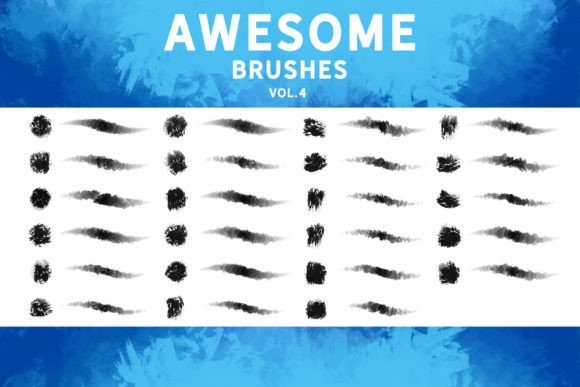
Awesome Brushes Vol. 4: A Practical Evaluation for Digital Artists and Concept Designers
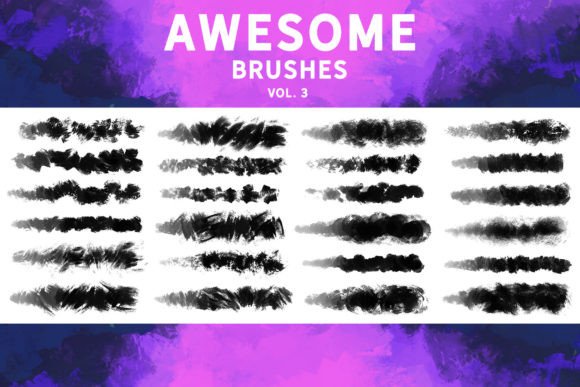
In the crowded marketplace of digital art tools, finding a brush set that bridges the gap between traditional media aesthetics and modern workflow efficiency is a persistent challenge. Awesome Brushes Vol. 4 emerges as a notable contender in this space, offering a curated collection of twenty-three distinct brushes designed to replicate the tactile richness of physical painting. For artists working across concept art, matte painting, and illustration, the value of a brush pack lies not just in the number of tools provided, but in their versatility and integration into existing software ecosystems. This evaluation explores the specific characteristics of this volume, its compatibility with major industry-standard applications, and how it fits into a broader professional toolkit.
The Core Philosophy: Beyond Simple Stamping
Many digital brush packs rely heavily on stamping mechanics, where a single click places a pre-rendered texture or shape onto the canvas. While useful for speed, these tools often lack the dynamic response required for genuine painting. Awesome Brushes Vol. 4 distinguishes itself by prioritizing paintability. The twenty-three included brushes are engineered to respond to pressure, tilt, and velocity, allowing users to build up layers, blend colors, and create organic transitions much like they would with oil, acrylic, or charcoal on paper.
This focus on "actual painting" capability is crucial for professionals who need to iterate quickly without sacrificing artistic integrity. When sketching initial concepts or blocking out complex scenes in matte painting, the ability to modulate stroke weight and opacity in real-time reduces the need for constant layer switching or manual masking. The textured feel of these brushes provides a rich, granular output that avoids the sterile, overly smooth look common in default digital toolsets. This aesthetic quality makes them particularly effective for establishing mood and atmosphere early in the creative process.
Software Compatibility and Workflow Integration
A significant advantage of Awesome Brushes Vol. 4 is its broad compatibility across multiple platforms. In an era where artists often switch between devices and software depending on the project phase, cross-platform support is a critical decision factor. The brushes are natively compatible with Photoshop CC and Procreate 5.0, covering the two most dominant environments for desktop and tablet-based creation respectively.
- Adobe Photoshop CC: As the industry standard for digital painting and photo manipulation, full support here ensures that professional studios can integrate these brushes into established pipelines without friction.
- Procreate 5.0: For artists who prefer the immediacy of iPad creation, the optimization for Procreate allows for a seamless transition from desk to mobile setup, maintaining consistent brush behavior across devices.
- Clip Studio Paint v1.10.5+: Users of this popular manga and illustration software can import the .abr files directly, expanding their textural options beyond the native library.
- Affinity Photo & Substance Painter: The inclusion of support for Affinity Photo appeals to those seeking cost-effective alternatives to Adobe, while compatibility with Substance Painter opens doors for texture artists working in 3D environments who need hand-painted details.
This multi-platform approach mitigates the risk of vendor lock-in. Artists investing in this pack are not limited to a single ecosystem, which enhances the long-term utility of the purchase. However, it is important to note that while .abr files are widely supported, the interpretation of pressure curves and tilt data can vary slightly between applications. Users may need to perform minor adjustments in settings menus when moving from Photoshop to Clip Studio Paint to achieve identical results.
Comparative Analysis: Where It Fits in Your Toolkit
When evaluating Awesome Brushes Vol. 4 against other resources, it is helpful to categorize it within the spectrum of specialized versus generalist tools. Generalist brush sets often offer hundreds of options, ranging from basic circles to complex particle effects. While comprehensive, these large packs can lead to decision paralysis and often contain redundant or low-quality assets. In contrast, this volume’s concise selection of twenty-three brushes encourages mastery. Each brush has been refined for a specific purpose, reducing the time spent searching for the right tool during a creative flow state.
Compared to highly specialized niche brushes—such as those designed exclusively for watercolor simulation or ink line art—this set offers a balanced middle ground. It is not intended to replace every specialized tool in an artist’s arsenal but serves as an ideal "workhorse" collection. For example, a concept artist might use a dedicated hard-edge brush for technical drawings but rely on the textured, rich-feel brushes from this volume for rapid environment blocking and atmospheric perspective.
The trade-off here is specificity versus versatility. If a project requires hyper-realistic watercolor bleeding effects, a dedicated watercolor engine might outperform these general textured brushes. However, for the majority of sketching, illustration, and matte painting tasks, the flexibility of this set provides sufficient range without the overhead of managing dozens of different brush libraries.
Ideal Use Cases and Limitations
Understanding when to deploy these brushes is key to maximizing their value. They are particularly well-suited for:
- Concept Art Sketches: The responsive nature of the brushes allows for quick iteration. Artists can block in shapes and values rapidly, leveraging the texture to suggest detail without rendering every element.
- Matte Painting Bases: Creating believable environments often requires blending photographic elements with painted details. The rich feel of these brushes helps unify disparate elements by adding a consistent painterly texture over the composite.
- Illustration Foundations: For illustrators who start with loose, expressive underpaintings, these brushes provide the necessary gestural quality to establish composition and lighting before moving to finer details.
However, there are limitations to consider. These brushes are designed for a "traditional look," which means they may not be the best choice for artists pursuing a clean, vector-style aesthetic or flat design graphics. Additionally, while they perform well in static illustrations, artists working in animation may find that the heavy texture requires additional optimization to maintain consistent frame-to-frame coherence.
Making an Informed Decision
Choosing the right digital tools is a subjective process that depends on individual style and workflow requirements. Awesome Brushes Vol. 4 represents a solid investment for artists who value tactile feedback and traditional aesthetics in their digital work. Its strength lies in its simplicity and high-quality execution rather than sheer volume. By focusing on twenty-three versatile, paintable brushes, it offers a streamlined experience that supports rather than hinders the creative process.
Before purchasing, artists should assess their current needs. If you frequently struggle with the "digital look" of your work and seek tools that introduce organic imperfection and texture, this set addresses that pain point effectively. Conversely, if your workflow relies heavily on automated patterns, symmetry tools, or hyper-clean lines, you may find more value in specialized geometric or ink-focused packs. Ultimately, the compatibility with major platforms like Photoshop, Procreate, and Clip Studio Paint ensures that regardless of your primary software, these brushes can be integrated into your routine with minimal technical barrier, making them a practical addition to a professional’s digital repertoire.