Unlocking the Full Potential of Awesome Brushes Vol 3 for Digital Artists
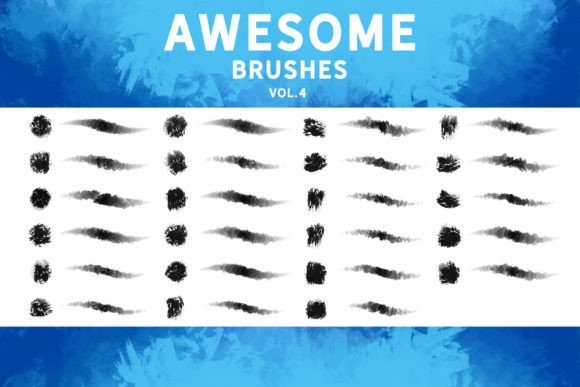
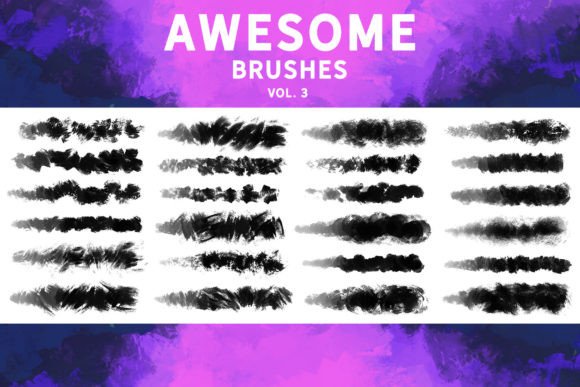
Digital art tools have evolved rapidly, yet many creators still struggle to find resources that bridge the gap between convenience and authentic artistic expression. Awesome Brushes Vol 3 emerges as a significant resource in this landscape, offering a collection designed not just for quick fixes but for genuine creative exploration. This pack distinguishes itself by providing twenty-five traditional-look brushes with varied textures and a rich feel. Unlike standard stamp overlays that merely paste an image onto your canvas, these tools allow you to actually paint, giving you control over stroke dynamics, pressure sensitivity, and texture buildup. Whether you are working on sketches, establishing a base for illustrations, developing concept art, or executing detailed matte paintings, understanding how to leverage this specific toolset can dramatically improve your workflow.
The Misconception of "Plug-and-Play" Artistry
A common mistake among both beginners and seasoned professionals is treating high-quality brush packs as magic wands. Many users download Awesome Brushes Vol 3 expecting instant masterpieces without adjusting their technique. This misunderstanding often leads to frustration when the results do not match the promotional images. The reality is that these brushes are designed to mimic traditional media, which requires a different approach than digital flat coloring. If you apply them with uniform pressure and speed, you will lose the nuanced texture that makes them valuable. To avoid this, take time to test each brush’s response to your tablet or stylus. Adjust your hand pressure and stroke speed to see how the bristles react. This experimental phase is crucial for integrating the brushes into your personal style rather than forcing your style to fit the tool.
Overlooking Software Compatibility Nuances
One of the most critical yet overlooked details when acquiring new digital assets is software compatibility. While Awesome Brushes Vol 3 is explicitly compatible with Photoshop CC and Procreate 5.0, users often assume seamless integration across all platforms without verifying version requirements. For instance, if you are using Clip Studio Paint, you must ensure you are running v1.10.5 or newer to import the .abr files correctly. Similarly, while Affinity Photo and Substance Painter support .abr imports, the behavior of textured brushes can vary significantly between programs due to differences in engine rendering.
Failing to check these specifications can result in wasted time troubleshooting broken brushes or distorted textures. Before purchasing or downloading, verify your current software versions. If you are a multi-platform artist, create a test file in each program to evaluate how the brushes translate. You may find that a brush perfect for sketching in Procreate needs slight adjustment in Photoshop to achieve the same organic feel. This proactive step ensures consistency in your work regardless of the device or software you are using at the moment.
Misjudging the Role of Texture in Concept Art
Another frequent error is underutilizing the textural capabilities of these brushes during the early stages of creation. Many artists reserve textured tools for final detailing, missing out on their potential for establishing mood and form in the initial phases. Awesome Brushes Vol 3 is ideal for creating a strong base for illustrations and concept art because the rich feel helps define light and shadow more naturally than hard-edged digital brushes. By ignoring this, artists often end up with flat compositions that require excessive post-processing to add depth.
To correct this, start your sketches and block-ins with these textured brushes. Use them to lay down broad strokes that suggest materiality—whether it is rough stone, soft fabric, or organic foliage. This approach not only speeds up the conceptualization process but also provides a more cohesive foundation for subsequent layers. It allows you to make decisive artistic choices early on, reducing the need for major corrections later in the pipeline.
Neglecting Brush Customization and Settings
Even the best brush pack is only as good as its configuration. A significant oversight is using the default settings for every project. While Awesome Brushes Vol 3 comes pre-configured for general use, your specific hardware and artistic needs may require tweaks. For example, the spacing, jitter, and transfer settings might need adjustment depending on your tablet’s sensitivity curve. Ignoring these parameters can lead to inconsistent strokes that break the illusion of traditional media.
Take the time to explore the brush settings panel in your chosen software. Experiment with changing the opacity flow or scattering to see how it affects the texture. Create duplicates of your favorite brushes from the pack and modify them for specific tasks, such as fine detailing versus broad washes. This customization empowers you to tailor the tools to your unique workflow, enhancing both efficiency and satisfaction.
Choosing the Right Brush for the Wrong Task
Not every brush in the volume is suitable for every stage of the painting process. A common pitfall is trying to use a heavy texture brush for fine line work or vice versa. This mismatch can clutter your artwork with unnecessary noise or make clean lines appear jagged and unprofessional. Understanding the intended use of each of the twenty-five brushes is key to maintaining clarity in your composition.
Organize your brush library by function rather than just name. Group them into categories like "Sketching," "Blocking," "Texturing," and "Detailing." This organization helps you quickly select the appropriate tool for the task at hand, preventing the temptation to force a brush to do something it was not designed for. When you respect the strengths of each tool, your artwork gains a level of polish and intentionality that stands out to viewers and clients alike.
Final Considerations for Smart Adoption
Before fully committing to Awesome Brushes Vol 3 in a professional project, consider conducting a small pilot study. Create a few quick studies or thumbnail sketches using only this pack. This practice will reveal any limitations or strengths specific to your style. It also helps you build muscle memory, ensuring that when you are under deadline pressure, you can rely on these tools instinctively.
Remember that the value of any digital asset lies in how well it serves your creative vision. By avoiding common mistakes such as ignoring compatibility, neglecting customization, and misapplying textures, you can maximize the utility of this brush set. Whether you are a freelancer looking to streamline your concept art process or a hobbyist aiming to enhance your digital sketches, approaching Awesome Brushes Vol 3 with a mindful and informed strategy will yield far better results than simply installing and hoping for the best. Embrace the learning curve, experiment with the traditional feel, and let these tools elevate your digital artistry to new heights.