Halloween Stamps Brushes Procreate Guide
Digital illustration offers a unique freedom that traditional media often cannot match, particularly when working with seasonal themes that demand both speed and consistency. For creators preparing for the autumn season, Halloween Stamps Brushes Procreate represents more than just a collection of digital assets; it is a workflow accelerator designed to help artists, designers, and hobbyists produce high-quality, thematic content without starting from scratch. Whether you are designing social media graphics, creating digital planners, or illustrating children’s books, having a reliable set of thematic tools can transform a tedious process into an enjoyable creative session.
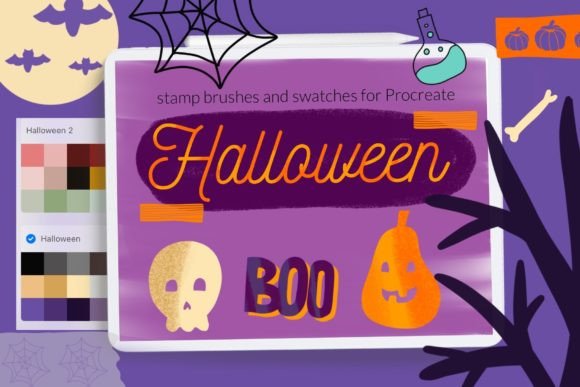
This specific brush set is curated exclusively for iPad users, ensuring that every element is optimized for the touch interface and Apple Pencil precision. The package includes a comprehensive suite of thirty-one distinct stamps and brushes, blending utility with aesthetic charm. By understanding how to leverage these tools effectively, you can elevate your Halloween projects from simple sketches to polished, professional-grade designs.
Exploring the Toolkit Components
The value of any digital brush set lies in its versatility and the quality of its individual components. This collection is thoughtfully divided into several categories, each serving a different purpose in the design hierarchy. At the core are the 25 cute doodle stamps. These are not merely static images but dynamic stamps that retain the hand-drawn feel essential for organic, approachable designs. They include classic Halloween motifs such as pumpkins, ghosts, bats, and candy, rendered in a style that is playful rather than frightening. This makes them ideal for brands targeting families, educators creating classroom materials, or influencers looking for friendly, engaging content.
Beyond the character stamps, the set includes Halloween decorate washi tapes stamps. Washi tape effects are incredibly popular in digital planning and scrapbooking because they add texture and structure to a layout. These digital tapes allow you to frame quotes, separate sections in a planner, or add decorative borders to invitations without the hassle of physical adhesive. The inclusion of these elements means you can create complex, layered compositions that mimic traditional mixed-media art.
To ensure your artwork has depth, the set provides one noise brush with texture. Digital art can sometimes appear too clean or sterile. A noise brush allows you to add grain, shadow, or atmospheric depth to your backgrounds, giving your illustrations a tactile, printed quality. Additionally, the package comes with 5 color swatches for Procreate featuring curated Halloween colors. Instead of wasting time searching for the perfect shade of burnt orange or midnight purple, you have immediate access to a harmonious palette that ensures visual consistency across your project.
Creative Applications for Different Users
The adaptability of Halloween stamp brushes for Procreate means they serve a wide range of professionals and enthusiasts. For small business owners and marketers, time is a critical resource. Using pre-made stamps allows for the rapid creation of promotional materials. Imagine designing an Instagram story series for a fall sale; instead of drawing each icon individually, you can drag and drop the doodle stamps, adjust their size, and arrange them around your text. This efficiency does not sacrifice originality, as the combination of stamps, textures, and colors remains unique to your arrangement.
Educators and parents will find these tools invaluable for creating engaging learning materials. The cute aesthetic is non-threatening and appealing to children. You can quickly design worksheets, reward charts, or digital storybooks that incorporate Halloween themes without needing advanced illustration skills. The washi tape stamps are particularly useful for organizing information, helping to break up text and make educational content more digestible.
For digital planners and journaling enthusiasts, this set is a treasure trove. The washi tapes and doodle stamps integrate seamlessly into digital planner templates. You can use the noise brush to add a subtle paper texture to your pages, enhancing the realism of the digital experience. The color swatches ensure that your weekly spreads maintain a cohesive autumnal theme, making your digital organization both functional and visually pleasing.
Installation and Technical Requirements
To get the most out of these tools, it is essential to understand the technical requirements and installation process. This brush set is designed Only for iPad Procreate. It is crucial to note that for Procreate version 4.0 or earlier, the brushset file format is not available. Users with older versions must rely on individual brush files. Ensuring your software is up to date guarantees access to the full functionality of the .brushset file, which keeps your library organized and easy to manage.
Installing Procreate brushes can be done in two primary ways, depending on your device and preference. The first method involves using the .brush and .brushset files directly. If you have an older iPad or Procreate version 4.0 or earlier, follow these steps:
- Download the folder containing the .brush file to a accessible location on your iPad, such as the Files app.
- Open the folder and locate the specific .brush files you wish to install.
- Tap and hold the file with your finger or Apple Pencil to bring up the context menu.
- Choose Share from the menu options.
- If the option Open in Procreate is missing, click on More to see additional apps.
- Scroll through the list, find Open in Procreate, and select it.
- Once imported, open your project in Procreate and click on the brush icon at the top right corner to access your new tools.
Alternatively, for a more streamlined experience within the app, you can use the import function:
- Open Procreate and navigate to the Brush Library.
- Click on any existing collection to expand it, then tap New Collection if you want to keep these Halloween brushes separate, or choose an existing one.
- Tap the + sign or look for the Import option depending on your interface version.
- Navigate to the folder where you downloaded the brushes.
- Select the desired brush or brushset file, and it will be automatically added to your Procreate library.
Achieving Consistency and Originality
While using stamps and pre-made elements speeds up workflow, maintaining originality is key to standing out. The secret lies in customization. Do not simply place the stamps on a white background. Use the noise brush to add texture to the canvas before placing your elements. Experiment with the blending modes of the layers containing your stamps. Changing a ghost stamp to "Multiply" can make it look like it is printed on textured paper, while "Screen" can give it a glowing, ethereal effect.
Utilize the provided 5 color swatches as a base, but do not be afraid to adjust the hue or saturation slightly to match your specific brand identity or artistic vision. Combining the washi tapes with hand-lettered text creates a balanced composition where the digital elements support rather than overpower your personal touch. By layering the cute doodle stamps with your own sketches, you create a hybrid style that is both efficient and uniquely yours.
Ultimately, Halloween Stamps Brushes Procreate is a tool that empowers you to focus on creativity rather than mechanics. It removes the barrier of entry for complex illustrations, allowing you to produce festive, high-quality work efficiently. Whether you are a seasoned designer or a weekend hobbyist, integrating these brushes into your workflow can inspire new ideas and streamline your creative process during the busy Halloween season.
© Let s Art ♡