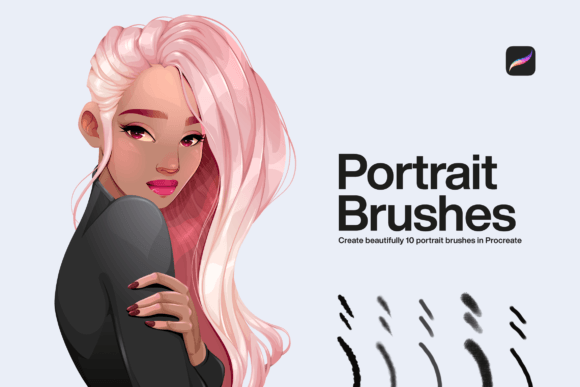
Mastering Digital Portraiture with 10 Portrait Brushes Procreate
Digital art has democratized the ability to create stunning visuals, but for many artists, the transition from traditional media to an iPad screen feels like losing a vital sense of touch. The friction of charcoal on paper or the drag of oil paint on canvas is missing. This is where specialized tools become essential. 10 Portrait Brushes Procreate are not just random digital stamps; they are engineered simulations designed to bridge that tactile gap. When you use your iPad as you would paint with portrait brushes, you are reclaiming the organic feel of traditional portraiture within a flexible digital environment.
These brush sets typically include a curated selection of tools ranging from soft blending smudgers to textured skin detailers and hair strand creators. The value lies not in the quantity of brushes, but in their specific calibration for human features. A generic round brush can draw a circle, but it cannot convincingly render the subtle subsurface scattering of light on a cheekbone or the chaotic flow of curly hair. That is the specific problem these ten brushes solve.
Why Specific Tools Matter for Human Features
Portraiture is arguably the most demanding genre in visual art because the human eye is incredibly sensitive to anomalies in facial structure and skin texture. If a landscape painting has a slightly off tree shape, viewers might not notice. If a portrait has unnatural skin smoothing or stiff hair, the entire image feels "uncanny."
Using 10 Portrait Brushes for Procreate allows artists to bypass the tedious process of creating custom brushes from scratch. Instead of spending hours adjusting jitter, streamline, and pressure curves, you can dive straight into the creative process. These brushes are pre-configured to respond naturally to Apple Pencil pressure and tilt. For instance, a well-designed skin brush will lay down pigment densely when you press hard but fade into a translucent glaze with a light touch, mimicking the behavior of watercolor or soft pastel.
Real-World Applications for Different Creators
The utility of these brushes extends far beyond fine art hobbyists. Various professionals and creators can integrate them into their workflows to save time and enhance quality.
Freelance Illustrators and Commission Artists
For freelancers, time is money. When taking on client commissions for character portraits or family illustrations, consistency and speed are crucial. A standardized set of 10 Procreate Brushes for Portrait ensures that every piece you deliver has a cohesive style. You do not need to reinvent your technique for each new face. By mastering this specific toolkit, you can reduce rendering time significantly. Imagine being able to sketch, block in colors, and refine details using only ten tools. This limitation actually breeds creativity and efficiency, allowing you to focus on capturing likeness rather than fiddling with settings.
Content Creators and Bloggers
In the age of personal branding, unique visuals stand out in a sea of stock photography. Bloggers and social media influencers often need custom header images or profile illustrations that reflect their personality. Using portrait brushes allows you to create stylized self-portraits or illustrations of your team members. These images feel more authentic and engaging than generic photos. You can create a signature look—perhaps a sketchy, energetic style or a soft, painterly aesthetic—that becomes recognizable to your audience across platforms like Instagram, LinkedIn, or your personal website.
Educators and Workshop Leaders
Art teachers and online course creators benefit greatly from having a reliable, simple toolset. When teaching digital portraiture to beginners, overwhelming students with hundreds of brush options can be paralyzing. Introducing a class to a focused set of 10 Portrait Brushes Procreate simplifies the learning curve. Instructors can demonstrate how one brush handles shading while another handles highlights, making the technical aspects of digital painting easier to grasp. It provides a common language for the classroom, ensuring all students are working with the same capabilities.
Small Business Owners and Marketers
Small businesses often need personalized marketing materials without the budget for high-end agency design. A business owner with basic artistic skills can use these brushes to create hand-drawn testimonials, customer spotlights, or team introduction graphics. A hand-painted portrait of a happy customer adds a layer of warmth and trust that polished vector graphics often lack. It signals effort and care, which resonates with consumers looking for authentic connections.
Integrating the Brushes into Your Workflow
To get the most out of these tools, it is important to understand how they interact with Procreate’s native features. These brushes are not magic wands; they require intentional application. Here is how different users might approach them:
- Layer Management: Use separate layers for sketching, base colors, shadows, and highlights. This allows you to adjust the opacity of specific elements without affecting the whole portrait.
- Blending Modes: Combine the portrait brushes with layers set to "Multiply" for shadows and "Overlay" or "Add" for highlights. This creates depth without muddying the colors.
- Reference Usage: Always work from high-quality reference photos. The brushes help with texture, but accurate anatomy comes from observation.
When you start using 10 Portrait Brushes for Procreate, resist the urge to use all of them at once. Pick three: one for blocking shapes, one for detailing, and one for blending. Master their nuances before expanding your toolkit. This focused approach helps build muscle memory, making your digital hand feel as confident as your physical one.
What to Consider Before Downloading
Not all brush sets are created equal. Before you commit to downloading or purchasing a set labeled as 10 Portrait Brushes Procreate, consider the following factors to ensure they meet your needs:
- Compatibility: Ensure the brushes are updated for the latest version of Procreate. Older brushes may not utilize the full range of Apple Pencil tilt and pressure sensitivity available on newer iPads.
- Style Match: Look at sample artwork created with the brushes. Do they produce the look you want? Some sets are designed for realistic oil painting styles, while others lean toward sketchy charcoal or soft airbrush effects. Choose a set that aligns with your artistic voice.
- Documentation: Good brush creators provide guides or video tutorials. Since you are getting a limited set of ten, understanding the intended use case for each brush is vital. Check if the seller offers support or examples.
- Resolution and Quality: Test the brushes at different canvas sizes. High-quality brushes should maintain their texture and edge definition whether you are working on a small thumbnail or a large print-ready file.
Enhancing Your Creative Confidence
Ultimately, the goal of using specialized tools like 10 Procreate Brushes for Portrait is to remove technical barriers. When you stop worrying about how to mix the perfect skin tone digitally or how to simulate hair strands, you free up mental energy for expression. You begin to see your iPad not just as a tablet, but as a versatile studio.
Whether you are illustrating a children’s book, designing a logo mascot, or simply exploring self-portraiture as a form of mindfulness, these brushes provide a structured path forward. They offer a balance between control and spontaneity, allowing for mistakes that look intentional rather than erroneous. In a digital world that often feels sterile, adding the warmth of hand-painted texture can make your work resonate more deeply with viewers.
By focusing on a concise, high-quality set of tools, you invest in skill development rather than hoarding assets. The next time you open Procreate, try limiting yourself to these ten brushes. You may find that constraints lead to greater freedom, and that painting digitally can feel just as alive and responsive as painting on paper.