Mastering Textured Digital Painting with Procreate Speckle Watercolour Brushes
Digital art has evolved significantly over the last decade, moving from flat, vector-like illustrations to rich, textured compositions that mimic traditional media. For artists using the iPad ecosystem, finding tools that bridge the gap between physical paint and digital precision is a constant pursuit. Procreate Speckle Watercolour Brushes represent a specialized solution in this space, offering a hand-crafted approach to simulating the unpredictable nature of water-based pigments. Unlike standard digital brushes that often feel too uniform or sterile, these tools are designed to introduce organic imperfections, such as granulation and salt effects, which are hallmarks of authentic watercolor painting.
This article explores the specific utility of these brushes, how they compare to other digital painting methods, and who stands to benefit most from integrating them into their workflow. By understanding the technical requirements and artistic possibilities, creators can make an informed decision about whether this pack aligns with their project goals.
Understanding the Distinctive Texture of Speckle Effects
The primary appeal of Procreate Speckle Watercolour Brushes lies in their ability to replicate the "happy accidents" of traditional watercolor. In physical painting, artists often use techniques like sprinkling salt on wet paint or using dry-brush methods to create textured, speckled patterns. These effects add depth, age, and character to artwork. Digitally achieving this look requires more than just a standard opacity setting; it demands complex brush engines that respond to pressure, tilt, and speed.
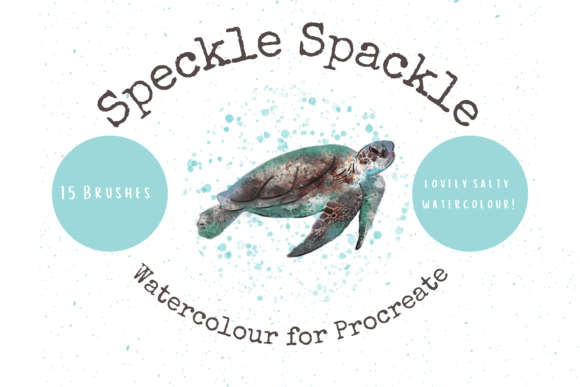
This particular pack contains 15 unique individual hand-crafted digital brushes. Each one is engineered to produce beautifully textured, salty watercolor effects. The term "speckle" refers to the scattered, granular appearance that occurs when pigment separates on rough paper or when resist materials are used. By digitizing this behavior, the brushes allow users to paint with a level of realism that static images or simple overlays cannot match. Because they are dynamic, they react to the user’s input, meaning no two strokes are exactly alike. This variability is crucial for maintaining the illusion of hand-painted art.
Key Features and Technical Specifications
When evaluating any digital asset, it is essential to understand what is included and how it functions. This brush pack is not a set of static clip art elements but rather functional tools within the Procreate environment. Key characteristics include:
- Customizability: All brushes can be resized and recolored to suit specific project needs. This flexibility ensures that the tools can adapt to both subtle background textures and bold foreground elements.
- Hand-Crafted Design: Unlike algorithmically generated brushes, these are created through a manual process, aiming to capture the nuance of human touch.
- Instant Download Format: The files are delivered digitally, requiring a platform like iCloud for storage and a utility like iZip to unzip the files before import.
- Integration: Once unzipped, the file imports automatically into Procreate within a named folder, streamlining the setup process for users familiar with the app.
Comparing Digital Brushes to Traditional Media and Other Digital Tools
Choosing the right tool often depends on the desired outcome and the constraints of the project. Procreate Speckle Watercolour Brushes occupy a middle ground between pure digital illustration and traditional painting. Here is how they compare to alternative approaches:
Versus Standard Digital Brushes
Standard brushes in Procreate or other software often prioritize smoothness and consistency. While excellent for clean line art or graphic design, they can lack the organic feel required for expressive landscapes or emotive portraits. Speckle brushes introduce noise and texture intentionally. For artists who find themselves spending hours adding grain filters or texture overlays in post-production, using a brush that generates these effects in real-time can significantly speed up the workflow. However, this comes with a tradeoff: less control over exact pixel placement compared to a hard-edged round brush.
Versus Traditional Watercolor
Traditional watercolor is unforgiving. Mistakes are difficult to correct, and materials like paper, paint quality, and humidity play massive roles in the final result. Digital speckle brushes offer the aesthetic of watercolor without the physical mess or cost of supplies. They allow for unlimited undo actions and easy color experimentation. However, they lack the tactile feedback of bristle on paper. Artists who value the physical ritual of painting may find digital tools satisfying visually but lacking in sensory engagement.
Versus Pre-Made Clip Art and Stamps
The description notes that these brushes are perfect for DIY projects, including greetings cards, scrapbooking, and print-on-demand goods. One might ask why use brushes instead of pre-made clip art elements. The answer lies in customization. Clip art is static; it cannot be easily reshaped or blended into a larger composition without looking pasted on. Brushes allow the artist to paint the texture directly onto the canvas, ensuring that lighting, perspective, and color harmony are consistent throughout the piece. This makes the final output look more cohesive and professional.
Ideal Use Cases and Practical Applications
Understanding where these tools excel helps in determining their value. The versatility of Procreate Speckle Watercolour Brushes makes them suitable for a wide range of creative endeavors.
Print-on-Demand and Commercial Goods
For entrepreneurs creating products for platforms like Etsy or Redbubble, uniqueness is key. Using these brushes to create original wall art, wrapping paper designs, or invitation backgrounds can help differentiate products from mass-produced templates. The textured look appeals to consumers seeking a handmade aesthetic, even if the product is digitally printed. Since the brushes can be recolored, a single design can be adapted into multiple colorways to test market preferences.
Digital Scrapbooking and Journaling
Digital planning and scrapbooking have grown in popularity among iPad users. These brushes allow for the creation of custom washi tapes, background papers, and decorative elements that mimic real-world materials. The ability to resize and recolor means that users can match their digital embellishments perfectly to their photo palettes or theme colors.
Fine Art Illustration
Illustrators working on children’s books or editorial pieces often seek a soft, approachable style. The salty, speckled texture adds warmth and nostalgia to characters and settings. It is particularly effective for depicting natural elements like stone, foliage, or aged fabrics, where uniform color would look artificial.
Technical Requirements and Limitations
Before purchasing or downloading, it is critical to acknowledge the hardware and software constraints. These files are digital brushes that will only work within the Procreate App. They are not compatible with Photoshop, Clip Studio Paint, or desktop-based software unless converted through complex third-party processes, which is generally not recommended for average users.
To utilize these brushes effectively, you need:
- An iPad capable of running the latest version of Procreate.
- The Procreate App installed.
- An Apple Pencil or compatible stylus. While finger painting is possible in Procreate, the precision and pressure sensitivity required to get the best out of textured watercolor brushes are best achieved with a stylus.
- A method to manage downloaded files, such as iCloud Drive, and a zip extraction tool like iZip if the device does not handle zipped folders natively.
If you do not own an iPad or prefer working on a desktop computer, this product will not meet your needs. In such cases, looking for equivalent brush sets for Photoshop or Krita would be a more logical path. Additionally, users should be comfortable with basic file management tasks, such as downloading, unzipping, and importing files, as technical support for installation issues is often limited with independent digital creators.
Making the Right Choice for Your Workflow
Deciding whether to invest time in learning Procreate Speckle Watercolour Brushes depends on your artistic goals. If you aim for clean, vector-style graphics or hyper-realistic digital photography manipulation, these brushes may serve little purpose. However, if your style leans towards the expressive, organic, and hand-crafted, they offer a powerful shortcut to achieving complex textures.
Consider your current pain points. Do you spend too much time trying to make digital art look "real"? Do you miss the texture of traditional media but dislike the cleanup? If so, these brushes provide a compelling compromise. They allow for the spontaneity of watercolor with the safety net of digital editing. For DIY enthusiasts and professional designers alike, the ability to generate unique, textured elements on demand adds significant value to the creative toolkit.
Ultimately, the best way to evaluate their fit is to consider the types of projects you currently undertake. For greetings cards, invitations, and wall art where texture adds perceived value, these tools are highly relevant. For technical diagrams or minimalist logos, they are likely unnecessary. By aligning the tool’s strengths with your specific creative output, you can ensure that your digital resources enhance rather than clutter your workflow.