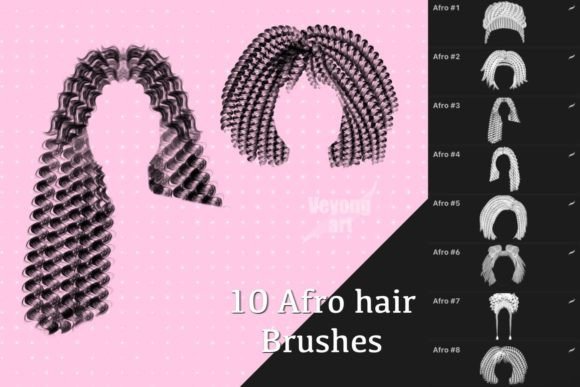
Mastering Texture: A Practical Guide to Using Procreate Afro Hair Brushes Effectively
Digital illustration has opened incredible doors for artists seeking to represent diverse textures and styles with precision. Among the most sought-after tools in this space are specialized brush sets designed specifically for rendering curly, coily, and textured hair. If you have recently purchased or are considering downloading Procreate Afro Hair Brushes, you are likely looking to streamline your workflow and achieve realistic results without spending hours on manual detailing. These tools are invaluable for character designers, portrait artists, and digital painters who want to capture the unique volume and pattern of natural hair.
However, excitement over new assets often leads to common pitfalls. Many creators dive in without understanding the technical limitations or the best practices for integration. This can result in frustration, wasted time, and artwork that feels stiff rather than organic. By addressing these misunderstandings early, you can ensure that your investment in high-quality brushes translates directly into improved artistic output.
Understanding Compatibility and Software Limitations
The most critical detail that often gets overlooked is software compatibility. It is essential to understand that Procreate Afro Hair Brushes are engineered exclusively for the Procreate app on iPad. They are not universal files. A frequent mistake beginners make is assuming these brush sets will work in Photoshop, Clip Studio Paint, Procreate Pocket, or other desktop applications. They will not.
These brushes rely on specific engine parameters unique to Procreate’s brushing system. Attempting to import them into other programs will either fail entirely or result in a generic, non-functional stamp that lacks the intended texture dynamics. Before purchasing or downloading, always verify that you are using the correct device and software version. If you are a multi-platform artist, check if the creator offers separate versions for other software. Do not assume cross-compatibility, as this leads to immediate disappointment and potential refund hassles.
Avoiding the "One-Click" Mindset
Another significant hurdle is the expectation that these brushes will do all the work for you. While they are powerful, they are tools, not magic wands. A common error is relying solely on the brush stroke to define the entire hairstyle without underlying structure. This approach often results in hair that looks like it is floating on top of the head, lacking weight, gravity, and connection to the scalp.
To avoid this, start with a solid base shape. Use a standard round brush to block in the overall volume and direction of the hair. Think of the specialized brushes as the detailing layer, not the foundation. Apply them over your base shapes to add texture, flyaways, and definition. This layered approach ensures that the hair feels integrated into the character’s anatomy. Remember, even the best Procreate Afro Hair Brushes require an understanding of form and light to look convincing.
Misunderstanding Brush Settings and Dynamics
Many users install new brushes and immediately begin painting with default settings. This is a missed opportunity. Each brush set comes with customizable parameters such as size jitter, opacity flow, and scattering. Ignoring these settings means you are not getting the full potential of the tool. For instance, if your strokes look too uniform or repetitive, adjust the scattering and rotation jitter to introduce natural variation.
Take time to read the included documentation or tutorial videos provided by the creator. Often, these resources explain the intended use case for each brush variant. Some brushes may be designed for tight coils, while others are better for loose curls or afro puffs. Using a tight coil brush for a loose curl style will require excessive effort and may produce unnatural results. Matching the right brush to the specific hair texture you are depicting is crucial for efficiency and realism.
Color and Lighting Mistakes
Texture is only half the battle; color and lighting bring hair to life. A frequent oversight is using flat, single-tone colors when applying these brushes. Natural hair reflects light in complex ways. Using only one shade can make the texture look muddy or flat, regardless of how detailed the brush stroke is.
Adopt a multi-layered coloring strategy. Start with a mid-tone base, then use the brushes to add darker shadows in the recesses of the curls and lighter highlights on the peaks where light hits. Consider using blending modes like Overlay or Soft Light for highlights to maintain the underlying texture while adding brightness. This technique adds depth and dimension, making the hair appear vibrant and healthy. Experiment with warm and cool tones to reflect environmental lighting, which adds a professional polish to your work.
Evaluating Quality Before You Buy
With the market flooded with digital assets, it is vital to evaluate quality before committing. Do not rely solely on promotional images, which are often heavily edited. Look for user reviews that mention ease of use, customer support, and update frequency. Check if the creator provides sample files or tutorials. A reputable seller will offer guidance on how to achieve the results shown in their previews.
Also, consider the organization of the brush set. Well-organized brushes with clear naming conventions save time during the creative process. If a set is disorganized or lacks clear labels, it can slow down your workflow significantly. Look for sets that categorize brushes by function, such as "base," "detail," and "flyaways." This structure helps you navigate the toolset efficiently, especially when working under deadlines.
Practical Steps for Better Results
To maximize the value of your Procreate Afro Hair Brushes, follow these practical steps:
- Practice on Studies: Before using the brushes on a final client piece, practice on simple head shapes. Focus on mastering the pressure sensitivity and stroke direction.
- Layer Management: Keep your hair layers separate from the skin and background. This allows you to adjust opacity, color balance, and effects without affecting the rest of the illustration.
- Reference Images: Always work from real-life references. Observe how light interacts with different hair textures. No brush can replace the insight gained from studying real-world examples.
- Customization: Don’t be afraid to tweak the brush settings. Duplicate a brush and adjust its properties to suit your personal style. The default settings are just a starting point.
By approaching these tools with patience and a willingness to learn, you transform them from simple assets into extensions of your artistic voice. Avoid the trap of expecting instant perfection. Instead, focus on building a workflow that integrates these brushes naturally into your existing process. With practice, you will find that Procreate Afro Hair Brushes significantly enhance your ability to create diverse, respectful, and beautiful representations of natural hair.
Remember, the goal is not just to use a new tool, but to improve your communication through art. When used correctly, these brushes help you tell richer stories and create characters that resonate with authenticity. Take the time to understand the nuances, respect the technical limitations, and enjoy the creative possibilities they unlock.