20 Tree Procreate Brushes Silhouette: Elevating Digital Landscapes with Precision and Style
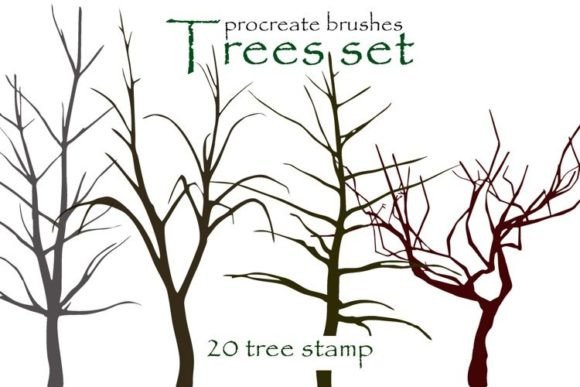
Digital illustration has evolved from simple sketches to complex, layered compositions that rival traditional media. For artists working in Procreate, the right tools can mean the difference between a flat image and a scene that breathes with depth and atmosphere. This is where specialized asset packs like the 20 Tree Procreate Brushes Silhouette become indispensable. These are not just generic stamps; they are carefully crafted digital tools designed to streamline the workflow of concept artists, illustrators, and hobbyists who need to populate their worlds with organic, believable vegetation without spending hours painting every leaf.
The core value of this collection lies in its duality. It offers a dedicated .brushset file for seamless integration into the Procreate app, ensuring that iPad users get the most out of Apple Pencil pressure sensitivity and tilt features. Simultaneously, the inclusion of a .abr file in the archive bridges the gap for professionals who work across multiple platforms, making these assets suitable for both Procreate and Photoshop. This flexibility is crucial for modern creatives who often start a piece on an iPad during a commute or while traveling, only to refine it later on a desktop workstation.
Accelerating Concept Art and Environment Design
For concept artists working in gaming, film, or animation, speed is often as important as quality. When designing environment concepts, the background elements—such as distant forests, horizon lines, and mid-ground foliage—need to be established quickly to set the mood and scale. Using the 20 Tree Procreate Brushes Silhouette allows artists to block in these elements in seconds rather than hours. Instead of manually painting each tree trunk and branch, you can use the silhouette brushes to create instant, high-contrast shapes that define the structure of your landscape.
This approach is particularly useful during the "thumbnailing" phase of concept art. Artists can experiment with different compositions, lighting scenarios, and atmospheric perspectives by layering various tree silhouettes. The stark contrast of a silhouette helps in evaluating the readability of a scene. If the composition works in black and white silhouettes, it will likely hold up when color and detail are added. This practical application saves significant time during client reviews, allowing for rapid iteration based on feedback.
Enhancing Storybook Illustrations and Editorial Work
Children’s book illustrators and editorial artists often face tight deadlines while needing to maintain a distinct artistic style. The versatility of having both silhouette brushes and stamp options provides a unique advantage. The silhouette brushes are perfect for creating moody, atmospheric backgrounds that do not distract from the main characters. By using these brushes, an illustrator can suggest a dense forest or a lonely oak tree with a single stroke, leaving room for the viewer’s imagination to fill in the details.
On the other hand, the stamp functionality included in the package allows for consistent repetition of specific tree types. This is invaluable when creating patterns for endpapers, textile designs, or decorative borders in editorial layouts. The ability to switch between the fluid, organic feel of a brush and the precise placement of a stamp gives artists greater control over the visual rhythm of their pieces. Whether you are illustrating a whimsical fairy tale or a serious news article about deforestation, these tools adapt to the tone required by the narrative.
Practical Considerations for Different User Levels
While the 20 Tree Procreate Brushes Silhouette pack is powerful, understanding how to integrate it effectively requires some consideration of your current workflow. Beginners might be tempted to rely solely on stamps, which can lead to repetitive and unnatural-looking landscapes. It is essential to remember that these tools are meant to aid creation, not replace artistic judgment. Combining the silhouette brushes with custom textures, blending modes, and color adjustments is key to achieving a professional look.
Intermediate and advanced users will appreciate the technical compatibility of the files. The .brushset format ensures that all settings, including grain, spacing, and pressure dynamics, are preserved exactly as the creator intended. This means you spend less time tweaking settings and more time creating. However, users should be aware that silhouette brushes work best when used with a steady hand and an understanding of light sources. Since silhouettes lack internal detail, their shape must be strong and recognizable. Practicing with these brushes can actually improve your fundamental drawing skills by forcing you to focus on form and contour.
Bridging the Gap Between Mobile and Desktop Workflows
One of the standout features of this product is the inclusion of the .abr file. Many digital artists start their careers on an iPad due to its portability and intuitive interface but eventually transition to or incorporate Photoshop into their pipeline for heavy-duty editing, print preparation, or complex compositing. Having a unified set of tree assets that work identically in both programs eliminates the friction of finding equivalent brushes for each platform.
This cross-compatibility is particularly beneficial for freelance designers who may receive files from clients in PSD format. Being able to open a file, add tree elements using the same brushes you used in Procreate, and maintain consistency in style is a huge productivity booster. It ensures that your personal brand or artistic signature remains consistent regardless of the device you are using at the moment. This seamless transition supports a hybrid workflow that is becoming increasingly common in the creative industry.
Maximizing Creative Potential with Layering Techniques
To get the most out of the 20 Tree Procreate Brushes Silhouette, consider employing layering techniques. Start with a large, soft silhouette brush to establish the mass of the forest in the background. Use a darker opacity to push these trees further into the distance, leveraging atmospheric perspective. Then, use sharper, more detailed silhouette brushes or stamps for the mid-ground and foreground elements. This creates a sense of depth and scale that flat images often lack.
Experimenting with blending modes can also yield surprising results. Try setting a tree silhouette layer to "Multiply" to integrate it naturally into a colored sky, or use "Overlay" to add texture and interest to existing painted areas. The stamps can be scattered randomly to create a base layer of foliage, which can then be refined with manual brush strokes to break up repetition and add organic irregularity. This combination of automated efficiency and manual artistry is where the true power of these tools lies.
Ultimately, the 20 Tree Procreate Brushes Silhouette pack is more than just a collection of digital assets; it is a workflow enhancer. It addresses the common pain points of time consumption and consistency in digital landscape painting. By providing robust tools for both Procreate and Photoshop, it empowers artists to focus on storytelling and composition rather than getting bogged down in the minutiae of painting individual leaves. Whether you are a seasoned professional looking to speed up your concepting phase or an enthusiast eager to create stunning digital landscapes, these brushes offer a practical, versatile solution that adapts to your creative needs.