Evaluating the 12 Marble Vein Brushes for Digital Texturing
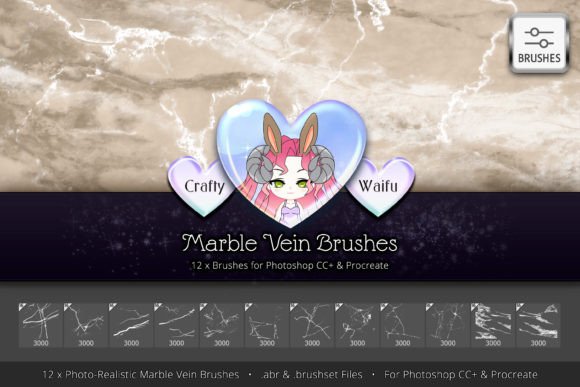
In the realm of digital art and graphic design, texture is often the differentiating factor between a flat, synthetic image and a composition that feels grounded in reality. For designers working with architectural visualizations, luxury branding, or abstract compositions, achieving authentic stone patterns can be time-consuming. The 12 Marble Vein Brushes set offers a specialized solution to this challenge. This installable addon provides twelve unique, photorealistic brushes designed specifically for Photoshop CC and Procreate, aiming to streamline the creation of marble, granite, and cracked surface effects.
Understanding the Toolset
This collection is not merely a set of generic stamps; it is a curated library of high-resolution assets derived from HD photographs. Each of the twelve brushes captures intricate details of natural stone formations, focusing on the erratic, organic lines characteristic of marble veins and granite fissures. The technical specifications are robust: every brush operates at 3000x3000 pixels with a resolution of 300dpi and 16-bit color depth. This high fidelity ensures that when scaled or layered, the textures retain their clarity without introducing pixelation or banding artifacts common in lower-quality assets.
The primary function of these brushes is to allow artists to "paint" realism. Rather than relying solely on static overlay images, users can manually apply vein structures, giving them control over direction, density, and opacity. This handmade approach facilitates the creation of custom textures that fit specific compositional needs, whether for a sleek countertop mockup or a rugged, grunge-style background.
Practical Applications and Use Cases
The versatility of the 12 Marble Vein Brushes extends beyond simple stone replication. While their primary intent is to generate homemade granite and marble textures, their utility spans several creative disciplines.
- Luxury Branding and Packaging: Designers can create bespoke marble backgrounds for product labels, business cards, or website headers, adding a touch of elegance without licensing expensive stock photography.
- Architectural Visualization: Interior designers and 3D artists can use these brushes to add realistic wear, tear, and natural variation to rendered surfaces, breaking up the uniformity of computer-generated materials.
- Grunge and Distress Effects: The set includes intricately detailed crack veins that are equally effective for simulating broken glass, cracked earth, or busted-up concrete. This makes them valuable for poster design, album covers, or thematic illustrations requiring a weathered aesthetic.
- Digital Painting: Concept artists can integrate these veins into landscape paintings to create realistic rock faces or cliff sides, enhancing the environmental storytelling.
Benefits of Using Specialized Vein Brushes
One of the most significant advantages of using this specific brush set is the balance between realism and control. Standard texture overlays often require complex masking and blending mode adjustments to look natural on irregular shapes. With these brushes, the artist dictates exactly where the vein appears. This level of control is crucial when matching the perspective of a 3D object or when trying to guide the viewer’s eye through a composition.
Furthermore, the photorealistic nature of the source material saves considerable time. Creating believable marble veins from scratch using standard round or square brushes requires advanced skill and hours of refinement. These pre-made assets provide a professional baseline that can be further customized, accelerating the workflow for both beginners and seasoned professionals. The compatibility with both Photoshop CC and Procreate also ensures that desktop and iPad users can maintain a consistent workflow across devices.
Considerations and Tradeoffs
While the 12 Marble Vein Brushes offer high-quality results, potential users should consider certain limitations. First, the set contains twelve unique brushes. For projects requiring extreme variety in stone types—such as distinguishing between Carrara, Calacatta, and Nero Marquina marbles—twelve options may feel restrictive. Users might find themselves repeating patterns if they do not employ techniques like rotation, scaling, and color adjustment to vary the output.
Additionally, the effectiveness of these brushes relies heavily on the user’s understanding of lighting and layer blending. Simply stamping a black vein onto a white background will look flat. To achieve true realism, one must adjust the opacity, use multiply or overlay blending modes, and potentially add noise or blur to integrate the vein with the underlying texture. Therefore, while the tool simplifies the creation of the vein itself, it does not automate the entire texturing process.
Another consideration is file size and performance. High-resolution, 16-bit brushes can be resource-intensive. Users working on older hardware or complex documents with many layers may experience slight latency when applying these brushes, although this is a common tradeoff for high-fidelity digital assets.
When to Choose This Set Over Alternatives
Deciding whether this brush set aligns with your goals depends on your specific workflow needs. This tool is a strong fit if you frequently create custom textures from scratch and value the ability to hand-place details. It is ideal for artists who prefer a painterly approach to texturing rather than a procedural or photographic collage approach.
However, alternatives may be worth considering in certain scenarios. If your work primarily involves large-scale architectural rendering where seamless, tileable textures are required, dedicated 3D material libraries or seamless pattern generators might be more efficient. Similarly, if you need hundreds of varied stone types instantly, a comprehensive stock photo subscription or a procedural texture plugin like Substance Designer could offer broader variety, albeit with a steeper learning curve or higher cost.
For those who already possess extensive libraries of stone textures, these brushes serve best as a complementary tool for adding specific, localized details—such as a prominent crack or a unique vein running through a focal point—rather than generating entire backgrounds.
Making an Informed Decision
When evaluating the 12 Marble Vein Brushes, consider your current pain points. If you struggle with the artificial look of default filters or spend excessive time masking stock photos, this set offers a direct, tactile solution. The emphasis on HD photography ensures that the raw material is credible, while the brush format provides the flexibility needed for custom design.
It is also important to assess your software environment. Since the set is optimized for Photoshop CC and Procreate, ensure your versions support these formats. The cross-platform compatibility is a notable benefit for hybrid workflows, allowing designers to sketch ideas on an iPad and refine them on a desktop without losing asset fidelity.
Ultimately, this brush set is a specialized instrument rather than a universal fix. It excels in delivering high-quality, realistic vein structures for marble, granite, and cracked surfaces. By understanding its strengths in manual control and photorealism, and acknowledging its limitations in variety and automation, you can determine if it integrates effectively into your digital toolkit. For designers seeking to elevate the tactile quality of their work with minimal overhead, these brushes represent a practical and efficient investment.