Evaluating the Utility of Circular Splatter Brushes for Digital Artists
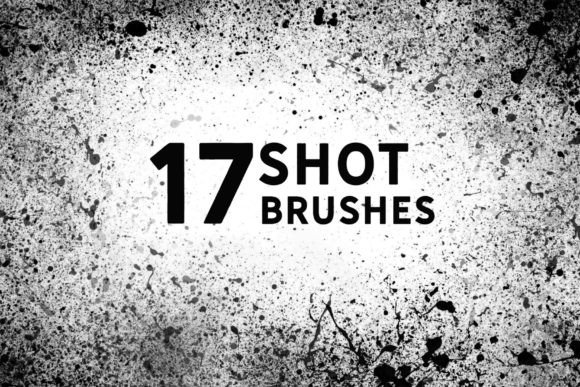
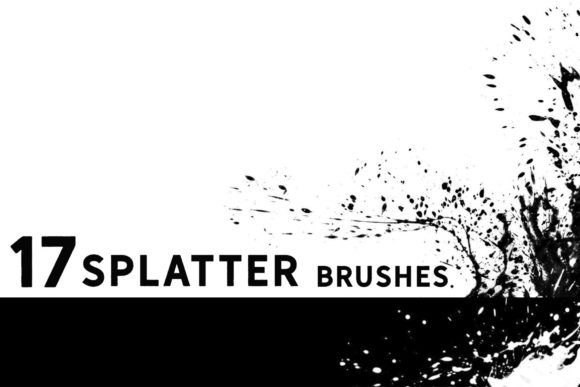
In the expansive ecosystem of digital art tools, brush packs often fall into two categories: novelty items that offer a fleeting moment of amusement, and foundational assets that genuinely streamline a professional workflow. The set known as Circular Splatter Brushes firmly belongs to the latter category. Comprising 17 distinct circular splatter brushes, this collection is designed not merely as a static library of stamp overlays, but as dynamic painting tools. For concept artists, illustrators, and matte painters who require speed without sacrificing organic texture, understanding the specific mechanics and applications of these brushes can significantly enhance productivity.
Beyond Static Stamps: Dynamic Painting Capabilities
A common misconception regarding splatter or texture brushes is that they function solely as "stamps"—static images placed onto a canvas with a single click. While this method has its place for quick background elements, it limits artistic control. The primary strength of these Circular Splatter Brushes lies in their ability to be used for actual painting. When you drag the cursor across the canvas, the brush responds to pressure, tilt, and velocity, creating a continuous, evolving trail of texture rather than a repetitive pattern of identical shapes.
This dynamic behavior is crucial for maintaining visual interest in large areas. In concept art and matte painting, artists often need to block in complex textures such as rusted metal, porous stone, or biological matter. Using a standard hard-edge brush for these tasks requires meticulous manual detailing, which is time-consuming. Conversely, using a static stamp can result in obvious, unnatural repetition. These circular splatter brushes bridge the gap by allowing the artist to "paint" the texture, ensuring that every stroke feels unique and integrated into the surrounding artwork. This flexibility makes them an ideal base for illustrations where underlying texture needs to be established quickly before detailed rendering begins.
Technical Compatibility and Workflow Integration
For any digital asset to be valuable, it must integrate seamlessly into existing workflows. One of the most practical aspects of this brush set is its broad compatibility. The brushes are natively optimized for Photoshop CC and Procreate 5.0, covering the two most dominant platforms for professional digital painting on desktop and tablet, respectively. This dual compatibility ensures that artists who switch between studio workstations and mobile setups can maintain a consistent textural language across their projects.
Furthermore, the utility extends beyond these primary applications. Users of Clip Studio Paint v1.10.5 or newer and Affinity Photo can import the .abr files directly. While the experience may vary slightly depending on how each software engine interprets brush dynamics, the core functionality remains intact. This cross-platform versatility is particularly beneficial for freelancers and small studios that may utilize a mix of software licenses. It eliminates the need to purchase separate texture packs for different programs, offering a more cost-effective and streamlined approach to asset management.
Practical Applications in Concept Art and Illustration
The true test of any brush pack is its performance in real-world scenarios. Here is how these 17 Circular splatter brushes can be effectively deployed in various stages of the creative process:
- Rapid Sketching and Ideation: In the early stages of concept art, the goal is to communicate form and mood rather than perfect detail. These brushes allow for rapid blocking of shapes with inherent texture. A circular splatter can instantly suggest the rough surface of a planet, the foliage of a distant tree line, or the corrosion on a sci-fi vehicle, allowing the artist to iterate faster.
- Matte Painting Backgrounds: Matte painters often deal with vast landscapes where micro-details are less critical than overall tonal value and texture. Using these brushes as a base layer helps break up the digital smoothness that often plagues 3D renders or photo-bashed compositions. They add an organic irregularity that helps blend disparate elements together.
- Organic Textures: The circular nature of the splatters makes them particularly suited for biological or natural subjects. They can simulate cell structures, lichen growth, mold, or even the distribution of stars in a nebula. By adjusting opacity and flow, artists can build up density gradually, creating depth and variation.
Quality, Consistency, and Long-Term Value
When evaluating digital resources, consistency is key. A high-quality brush pack should perform predictably across different canvas sizes and resolutions. These Circular Splatter Brushes demonstrate reliable performance, maintaining their structural integrity whether used on a small sketch pad or a large-format print file. The edges of the splatters are well-defined yet soft enough to blend naturally with other brush strokes, avoiding the harsh, cut-out look that cheaper texture brushes often exhibit.
The set includes 17 variations, which provides sufficient diversity without causing decision paralysis. Each brush offers a slightly different density, spread, and edge characteristic. This variety allows for layering; an artist might use a denser splatter for the core of a shape and a more diffuse one for the edges, creating a sense of volume and atmospheric perspective. From a long-term value perspective, these are not trend-dependent assets. Texture and organic noise are timeless elements in digital art, meaning this pack will remain relevant regardless of shifting stylistic trends in illustration or design.
Who Benefits Most from This Toolset?
While hobbyists will certainly find enjoyment in experimenting with these tools, the primary beneficiaries are professionals who operate under tight deadlines. Concept artists, environment designers, and illustrators who need to produce high volumes of work will appreciate the time-saving nature of dynamic texture brushes. Additionally, educators teaching digital painting fundamentals can use these brushes to demonstrate how texture influences form and light, providing students with a tangible tool to understand complex surface interactions.
However, it is important to note potential limitations. These brushes are specialized tools. They are not a replacement for fundamental drawing skills or custom brush creation for highly specific needs. Artists looking for precise, geometric patterns or clean vector-style lines will not find what they need here. The value lies specifically in organic, chaotic, and textured applications. Therefore, users should view this pack as a complementary addition to their toolkit rather than a comprehensive solution for all painting tasks.
Final Recommendations for Implementation
To get the most out of these Circular Splatter Brushes, consider integrating them into your workflow as part of a layered approach. Start with a flat color base, then use the splatter brushes on a separate layer set to Multiply or Overlay mode to introduce texture. This non-destructive method allows for easy adjustments to intensity and color without altering the underlying drawing. Experiment with blending modes and opacity settings to discover how the circular forms interact with your specific color palettes.
In conclusion, the Circular Splatter Brushes set offers a robust, versatile, and professionally viable solution for adding organic texture to digital artworks. Its compatibility with major industry-standard software, combined with its dynamic painting capabilities, makes it a worthwhile investment for serious creators. By moving beyond simple stamping and embracing the painting potential of these tools, artists can enhance both the efficiency and the visual richness of their projects. Whether you are refining a matte painting or sketching initial concepts, these brushes provide the tactile feedback and visual complexity needed to elevate digital media.