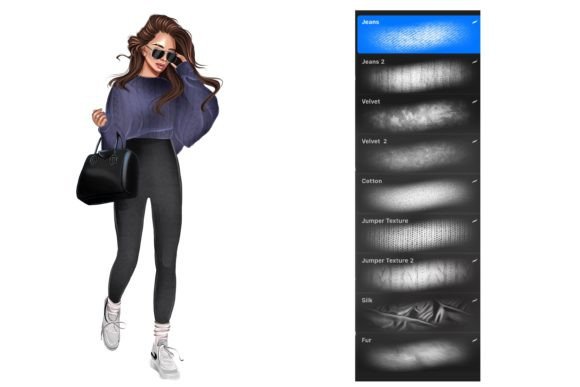
Mastering Digital Realism: A Guide to Fabric Texture Procreate Brushes for iPad Artists
In the rapidly evolving world of digital art, the line between traditional media and digital creation continues to blur. For artists using the iPad and the Procreate app, achieving a sense of tactile realism is often the final hurdle in creating truly immersive illustrations. This is where specialized tools come into play. Specifically, Fabric Texture Procreate Brushes have emerged as an essential resource for designers, illustrators, and digital planners who wish to infuse their work with the warmth and complexity of physical materials.
These sets of Procreate texture brushes are designed explicitly to be used with the iPad and the Procreate app, offering a bridge between the smooth, sterile nature of digital pixels and the organic irregularity of woven cloth. By integrating these tools into your workflow, you can elevate simple shapes into rich, textured compositions that invite the viewer to reach out and touch the screen.
Understanding the Role of Texture in Digital Design
Texture is more than just a visual effect; it is a fundamental element of design that communicates weight, age, and materiality. In traditional painting, an artist might use thick impasto or dry brushing techniques to mimic the roughness of canvas or the sheen of silk. In the digital realm, replicating this requires precise brush engines that understand how light interacts with surface irregularities.
Fabric Texture Procreate Brushes serve this exact purpose. They are not merely stamps; they are sophisticated algorithms that simulate the weave, fray, and grain of various textiles. Whether you are designing a character’s clothing, creating background elements for a web layout, or embellishing a digital journal entry, these brushes provide the necessary depth to make your art feel grounded in reality.
Why Choose Specialized Fabric Brushes?
One might ask why a general-purpose brush isn't sufficient. The answer lies in efficiency and authenticity. Creating a realistic linen or denim texture from scratch using standard round brushes would take hours of meticulous detailing. With a dedicated set of 9 fabric texture brushes, this process is reduced to seconds. These tools allow you to:
- Save Time: Instantly apply complex patterns without manual repetition.
- Maintain Consistency: Ensure that all textile elements in a piece share a cohesive visual language.
- Enhance Realism: Add subtle imperfections that mimic real-world manufacturing processes.
Exploring the Kit: What You Get
When you acquire a high-quality set of fabric texture brushes, you are investing in versatility. This specific collection includes 9 fabric texture brushes ONLY FOR PROCREATE. Each brush is engineered to respond naturally to the Apple Pencil’s pressure and tilt sensitivity, ensuring that every stroke feels intuitive and organic.
These stamp brushes will help with your digital planning by providing ready-made assets that can be layered, masked, and manipulated. Unlike static images, these brushes remain editable. You can change colors, add or erase details as you wish, allowing for complete creative control. This flexibility is crucial for modern workflows where clients may request last-minute color changes or stylistic adjustments.
Practical Applications in Modern Creativity
The utility of fabric textures extends far beyond fine art illustration. Here is how different creators can leverage these tools in their daily activities:
- Digital Planning and Journaling: Planners often seek a "scrapbook" aesthetic. Using fabric textures allows users to create digital washi tapes, pocket inserts, and background papers that look like genuine paper and cloth collages.
- Fashion Illustration: Designers can sketch garments with accurate representations of denim, wool, or cotton, helping clients visualize the final product more effectively.
- Graphic Design and Branding: Logos and packaging designs benefit from tactile textures that suggest quality and craftsmanship. A coffee brand, for example, might use a burlap texture to convey organic origins.
- Social Media Content: Influencers and content creators can add unique textural overlays to their posts, making their feeds stand out in a sea of flat, minimalist designs.
How to Use Fabric Texture Brushes Effectively
To get the most out of your Fabric Texture Procreate Brushes, it is important to understand the technical aspects of how they interact with the Procreate interface. Here is a step-by-step approach to integrating them into your workflow:
1. Layer Management is Key
Always apply texture brushes on a separate layer above your base colors. This non-destructive approach allows you to adjust the opacity and blending modes without altering the underlying artwork. Common blending modes such as Multiply, Overlay, and Soft Light can dramatically change how the texture interacts with the colors beneath it.
2. Utilizing Clipping Masks
If you want the texture to appear only within the boundaries of a specific shape—such as a shirt or a cushion—use a clipping mask. Create a new layer above your object, clip it, and then paint with your fabric brush. This ensures clean edges and prevents the texture from spilling over into the background.
3. Color Customization
As mentioned, you can change colors easily. Select the brush and choose your desired hue from the color wheel. Because these brushes are designed with transparency and variation in mind, they retain their textural integrity even when shifted from dark navy to pastel pink. This adaptability makes them suitable for any color palette.
Common Misconceptions About Digital Textures
Despite their popularity, there are several misunderstandings regarding the use of texture brushes in digital art. Clarifying these can help beginners avoid common pitfalls.
Misconception 1: Textures Make Art Look Cluttered.
In reality, texture adds depth, not noise. The key is subtlety. Lowering the opacity of your texture layer often yields the most professional results. The goal is to suggest the material, not to overwhelm the viewer with pattern.
Misconception 2: These Brushes Are Only for Realistic Art.
While they excel at realism, fabric textures can also be used in stylized or abstract art. They can add visual interest to flat design pieces, breaking up large areas of solid color and adding a handcrafted feel to vector-style illustrations.
Misconception 3: High-End Hardware Is Required.
These brushes are optimized for the iPad and Procreate app, which run efficiently on a wide range of devices. You do not need the latest iPad Pro to achieve stunning results; even older models can handle these stamp brushes with ease.
The Significance of Tactile Digital Tools
In an increasingly digital world, there is a growing nostalgia for the physical. People crave the imperfections of hand-made objects. By using Fabric Texture Procreate Brushes, artists can inject this human element into their digital work. It connects the viewer to the universal experience of touching fabric, evoking memories and emotions that flat colors cannot.
Furthermore, these tools democratize high-quality design. Previously, achieving such detailed textile effects required advanced photography skills or expensive stock image subscriptions. Now, any individual with an iPad can create original, copyright-free textured assets instantly. This empowers small business owners, educators, and hobbyists to produce professional-grade materials without a steep learning curve.
Conclusion
The integration of Fabric Texture Procreate Brushes into your digital toolkit represents a significant step toward mastering the nuances of digital illustration. These 9 specialized brushes offer a perfect blend of convenience and artistic control, allowing you to transform flat designs into vibrant, tactile experiences. Whether you are a seasoned illustrator or a beginner exploring digital planning, understanding how to manipulate light, shadow, and texture will enhance the impact of your work.
Remember, the power of these tools lies not just in their ability to mimic reality, but in their flexibility. You can change colors, add or erase details as you wish, and experiment with endless combinations. By embracing these resources, you join a community of creators who value both efficiency and artistic integrity. Start experimenting today, and discover how a simple texture can breathe new life into your digital creations.
For those interested in expanding their library further, consider exploring complementary brush sets that focus on paper grains, watercolor bleeds, or charcoal smudges. Combining these with your fabric textures can create rich, mixed-media effects that truly stand out in the digital landscape.