Unlocking Creative Potential with Procreate Background Brushes Set 1
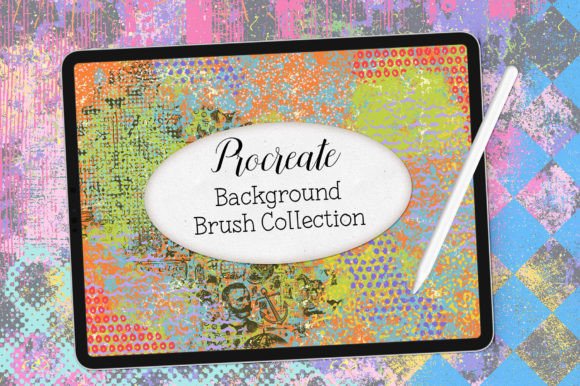
In the rapidly evolving landscape of digital illustration, the tools we choose define not just the efficiency of our workflow but the very aesthetic identity of our work. For artists using the iPad as their primary canvas, Procreate has become the industry standard, offering an intuitive interface paired with powerful rendering engines. However, even the most skilled illustrator can find themselves staring at a blank white screen, paralyzed by the initial step of establishing atmosphere and context. This is where specialized assets like Procreate Background Brushes Set 1 transform the creative process, shifting the focus from tedious manual rendering to expressive composition.
This collection represents more than just a set of digital stamps; it is a foundational toolkit designed to accelerate the creation of complex visual environments. By understanding the specific mechanics and applications of these brushes, creators across various disciplines—from graphic designers to hobbyist illustrators—can elevate their output while maintaining a unique artistic voice. It is crucial to note from the outset that these brushes are engineered exclusively for the Procreate ecosystem. They will NOT work in any other programs or apps, such as Photoshop, Clip Studio Paint, or Affinity Designer. This specificity ensures optimized performance and seamless integration with Procreate’s native gesture controls and layer blending modes.
The Mechanics of Digital Texture and Atmosphere
To fully appreciate the utility of this brush set, one must understand the difference between foreground detailing and background establishment. Foreground elements typically require sharp lines, high contrast, and precise anatomy. Backgrounds, conversely, rely on suggestion, texture, color harmony, and depth. Mix and match the brushes within this set to create layers of visual interest that recede naturally into the distance, allowing the main subject to pop without competing for attention.
The brushes included in Procreate Background Brushes Set 1 are calibrated to respond dynamically to pressure and tilt. When you press harder, the opacity or density may increase, mimicking the behavior of traditional media like watercolor washes, charcoal smudges, or acrylic impasto. This responsiveness allows for organic variation, preventing the "digital look" that often plagues amateur artwork. By leveraging these naturalistic behaviors, artists can generate abstract artwork that feels hand-crafted rather than algorithmically generated.
Enhancing Workflow Efficiency
Time is a critical resource for professional creatives. Creating a textured background from scratch using basic round brushes can take hours of meticulous layering and masking. With dedicated background brushes, this process is condensed into minutes. The ability to rapidly block in colors, add noise, simulate paper grain, or create atmospheric haze means that artists can iterate on concepts faster. This speed is particularly valuable in commercial settings where clients may request multiple variations of a mood board or concept art piece.
Furthermore, the non-destructive nature of digital art allows for endless experimentation. If a particular texture does not suit the composition, it can be adjusted via opacity, erased, or blended with different modes without damaging the underlying sketch. This flexibility encourages risk-taking, leading to more innovative and unexpected results.
Diverse Applications Across Creative Fields
The versatility of Procreate Background Brushes Set 1 extends far beyond simple landscape painting. Its utility spans multiple creative domains, each benefiting from the unique textural qualities the brushes provide.
- Character Illustration: A character portrait often feels flat when placed against a pure white or solid color background. Using these brushes, an artist can add subtle gradients, light leaks, or textured overlays that ground the character in a believable space.
- Digital Scrapbooking and Journaling: For those who use Procreate for digital planning, these brushes offer realistic paper textures, tape marks, and ink splatters that add a tactile feel to digital pages.
- Social Media Content Creation: Influencers and marketers need eye-catching visuals. Abstract backgrounds created with these tools serve as perfect backdrops for typography, product mockups, or quote graphics, ensuring the text remains legible while the image remains engaging.
- Concept Art and Storyboarding: Quick environment sketches require rapid indication of mood and lighting. These brushes allow concept artists to establish weather conditions, time of day, and material surfaces quickly, facilitating better communication with directors and team members.
Creating Unique Abstract Artwork
Abstract art relies heavily on the interplay of form, color, and texture. Procreate Background Brushes Set 1 is an ideal companion for abstract expressionists working digitally. By layering different brush strokes, adjusting blend modes to "Multiply," "Overlay," or "Screen," and varying the color palette, artists can create complex compositions that evoke emotion without depicting recognizable objects.
The key to mastering this style is experimentation. Start with a broad, low-opacity wash to establish a base tone. Then, introduce sharper, higher-contrast strokes to create focal points. Use the eraser tool with the same brush settings to subtract information, creating highlights and negative space. This additive and subtractive process mirrors traditional painting techniques, providing a familiar workflow for artists transitioning from physical to digital media.
Technical Considerations and Best Practices
While these tools are powerful, their effectiveness depends on proper usage. Since these brushes are optimized specifically for Procreate, users should ensure their iPad and app are updated to the latest versions to avoid compatibility issues. Remember, these assets are locked to the Procreate environment; attempting to import them into other software will result in errors or unsupported file formats.
Layer management is another critical aspect. When using heavy texture brushes, it is advisable to keep background elements on separate layers from the main subject. This separation allows for independent adjustment of blur, opacity, and color balance. Additionally, utilizing clipping masks can help contain textures within specific shapes, maintaining clean edges while still benefiting from the organic feel of the brushes.
Color theory also plays a pivotal role. Backgrounds should generally support the foreground, not overpower it. Using complementary colors for the background can make the subject stand out, while analogous colors create harmony and calm. The brushes in this set handle color blending smoothly, allowing for soft transitions that enhance the overall cohesion of the piece.
The Importance of Exclusive Compatibility
The restriction that these brushes will NOT work in any other programs is actually a benefit for Procreate users. It means the brush developers have tuned the spacing, scatter, jitter, and pressure curves specifically for Procreate’s rendering engine. This results in smoother strokes, less lag, and more predictable behavior compared to generic brushes ported from other software. Users can trust that the brush will perform consistently, allowing them to focus on creativity rather than troubleshooting technical glitches.
For educators and students, this exclusivity simplifies the learning curve. Instructional materials can assume a uniform toolset, ensuring that tutorials and demonstrations are accurate and reproducible for all participants using the recommended software.
Endless Fun and Creative Growth
Ultimately, the value of Procreate Background Brushes Set 1 lies in the joy of creation. Digital art can sometimes feel sterile or overly controlled. These brushes reintroduce an element of surprise and playfulness. Each stroke offers a slightly different result, encouraging artists to let go of perfectionism and embrace the happy accidents that often lead to breakthroughs in style and technique.
Whether you are a seasoned professional looking to streamline your workflow, a student exploring new mediums, or a hobbyist seeking relaxation through art, this toolset provides the building blocks for visual storytelling. By integrating these brushes into your daily practice, you open up new avenues for expression, allowing your imagination to roam freely across textured, vibrant, and dynamic digital landscapes. The combination of technical precision and artistic freedom makes this set an indispensable asset for anyone serious about digital illustration on the iPad.
As you continue to explore the capabilities of these tools, remember that mastery comes from consistent practice. Do not be afraid to break rules, mix unexpected colors, or combine brushes in unconventional ways. The digital canvas is forgiving, and with the right tools, the only limit is your own creativity. Embrace the process, enjoy the tactile feedback of the Apple Pencil, and watch as your backgrounds evolve from afterthoughts into integral components of your artistic vision.